# AI Links & llms
## AI Links & llms
**File:** `src/config/config.toml` · **Skill level:** Beginner
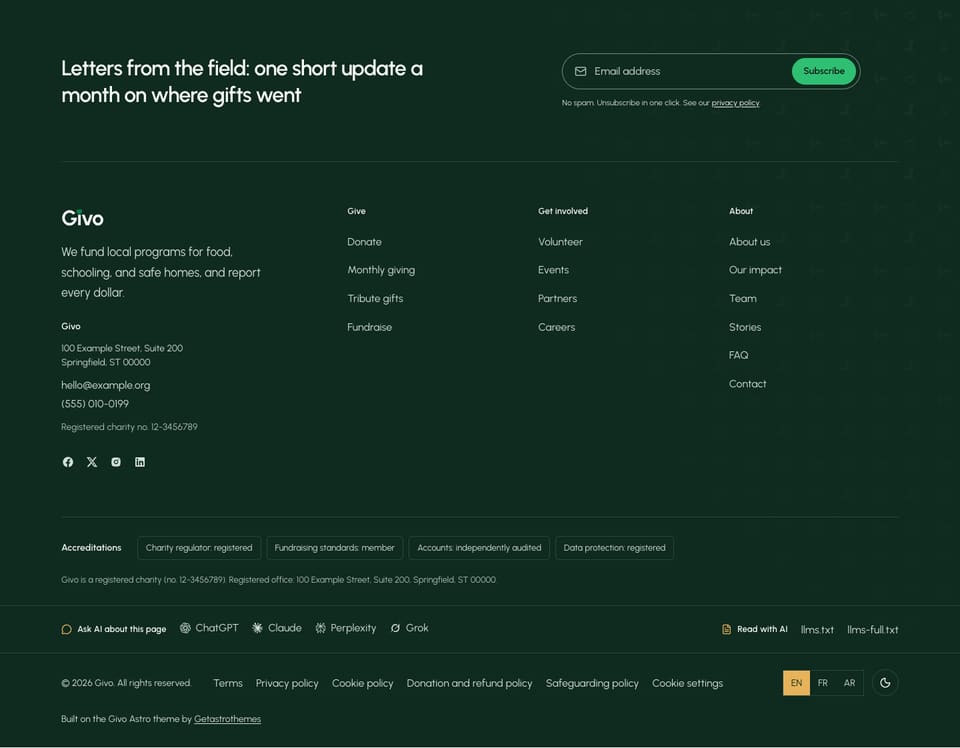
More people now ask an AI assistant which charity to support, or what a charity does with its money, before they visit a website. Givo helps assistants read your site correctly in three ways, and helps your visitors ask an assistant about a page:
1. **Ask AI links** in the footer of every page, and a **Copy page** menu on every story.
2. **AI-readable files**: `/llms.txt`, `/llms-full.txt`, and a Markdown copy of the main pages.
3. **Crawler switches** in `robots.txt`, to allow or block AI search and AI training.
This page also covers the **theme credit** line, which appears in the same footer and at the end of `llms.txt`.
### Ask AI Links
Every footer layout has a row with **Ask AI about this page** and a link per assistant: ChatGPT, Claude, Perplexity, and Grok. Each link opens the assistant with a question about the page the visitor is on. The same row has **Read with AI**, with links to the Markdown copy of the page (**This page (.md)**, where one exists), `llms.txt`, and `llms-full.txt`.
Every story (`/blog//`) also has a **Copy page** menu under the byline. **Copy page** copies the story's Markdown copy, and the arrow next to it opens **View as Markdown** and an **Ask** link per assistant. The two Markdown items need `markdownPages = true` in `[seo.ai]`; without them the button reads **Ask AI** and opens only the Ask links.
The settings are in `[settings.pageActions]`:
```toml
[settings.pageActions]
enable = true
footer = true # Footer row with AI links and llms.txt on every page, in every footer layout
providers = ["chatgpt", "claude", "perplexity", "grok"]
```
| Setting | What it does |
| ----------- | -------------------------------------------------------------------------------------------- |
| `enable` | `false` turns off the footer row and the **Copy page** menu on stories |
| `footer` | `false` removes the row from the footer and keeps the menu on stories |
| `providers` | Which assistants get a link, in this order. Any of the four. An empty list `[]` hides the Ask links |
The labels ("Ask AI about this page", "Read with AI", "Copy page", "View as Markdown", "Ask ChatGPT") are under `ai` in `src/i18n/.json`, one file per language.
### llms.txt And Markdown Copies
When you build the site, Givo writes:
- **`/llms.txt`**: a short index for AI tools. It starts with a description of the site, then an **Organization facts** list taken from `[organization]` in `config.toml` (name, registration number, year founded, phone, email, address, office hours), your currency, the tax note, and the donate link. After that it lists your causes, events, stories, and key pages, each with its description.
- **`/llms-full.txt`**: the full text of every page in one file.
- **One pair per language**: `/fr/llms.txt`, `/ar/llms.txt`, and so on. Each one links to the others.
- **A Markdown copy of each cause, event, story, job, and key page** at the page address with `.md` at the end, for example `/causes/clean-water-wells.md` or `/donate.md`. Assistants read these more easily than the full web page.
The switches are in `[seo.ai]`:
```toml
[seo.ai]
llmsTxt = true # /llms.txt and /llms-full.txt, per language
markdownPages = true # A Markdown copy of each cause, event, story, job, donate, FAQ, and impact page
indexNowKey = ""
```
To leave one page out of `llms.txt` and the Markdown copies, add `excludeFromAi: true` to its frontmatter. The **This page (.md)** link in the footer needs `markdownPages = true`.
### AI Crawlers In robots.txt
`robots.txt` is built from `[seo.robotsTxt]`. Two switches decide what AI crawlers may do:
```toml
[seo.robotsTxt]
enable = true
disallow = []
aiSearch = true
aiTraining = true
contentSignals = false
```
| Setting | What it does |
| ---------------- | ------------------------------------------------------------------------------------------------------------------------------------------------------------------- |
| `aiSearch` | AI search and answer tools that fetch pages to quote them (ChatGPT search, Claude, Perplexity). `true` lets them name you in answers such as "charities near me that help children". `false` removes the site from their answers |
| `aiTraining` | Crawlers that collect text to train AI models. `false` opts out of training only, and search answers keep working |
| `contentSignals` | `true` adds a `Content-Signal` line with the two choices above. Lighthouse does not know this line yet and lowers the SEO score |
Google's AI Overviews use the normal Googlebot, so they follow your normal search rules, not these switches. The crawler lists are in `src/lib/utils/aiCrawlers.ts`.
### IndexNow
IndexNow tells Bing and a few other search engines which pages changed, so they visit them sooner. Bing also feeds ChatGPT search and Copilot. To use it, set an 8 to 128 character key (letters, numbers, dashes) in `indexNowKey` in `[seo.ai]`, deploy, then run this after each deploy:
```bash
npm run indexnow
```
An empty `indexNowKey` turns it off. For more on search, see [SEO & AI Visibility](/givo/customization/seo-ai-visibility/).
### The Theme Credit
Every footer layout ends with one line, "Built on the Givo Astro theme by Getastrothemes", and the same line closes `llms.txt`. It is set in `[settings.themeCredit]`:
```toml
[settings.themeCredit]
enable = true
text = "Built on the Givo Astro theme by [Getastrothemes]"
url = "https://getastrothemes.com/astro-themes/givo/"
```
The part of `text` in `[brackets]` becomes the link to `url`. The line is the same English sentence in every language. Set `enable = false` to remove it. We appreciate it when you keep it.
The copyright line above it is separate: `[settings.copyright]`, with the text per language in `src/i18n/.json`. See [Footer](/givo/customization/footer/).
### Do It With AI
```text
On my Givo site, show Ask AI links for [ChatGPT and Claude] only, keep the llms.txt files, and
block AI training crawlers but keep AI search. Change only [settings.pageActions] and
[seo.robotsTxt] in src/config/config.toml, then run npm run build and show me the AI part of
dist/robots.txt.
```