# Introduction
Givo is an Astro and Tailwind CSS theme for charities and non-profit organizations: causes with fundraising goals, one-time and monthly donations with an impact receipt, events, volunteering, fundraising, and an impact and transparency page. It ships 3 homepages and the usual inner pages, in English, French, and Arabic with full right-to-left support, in light and dark mode.
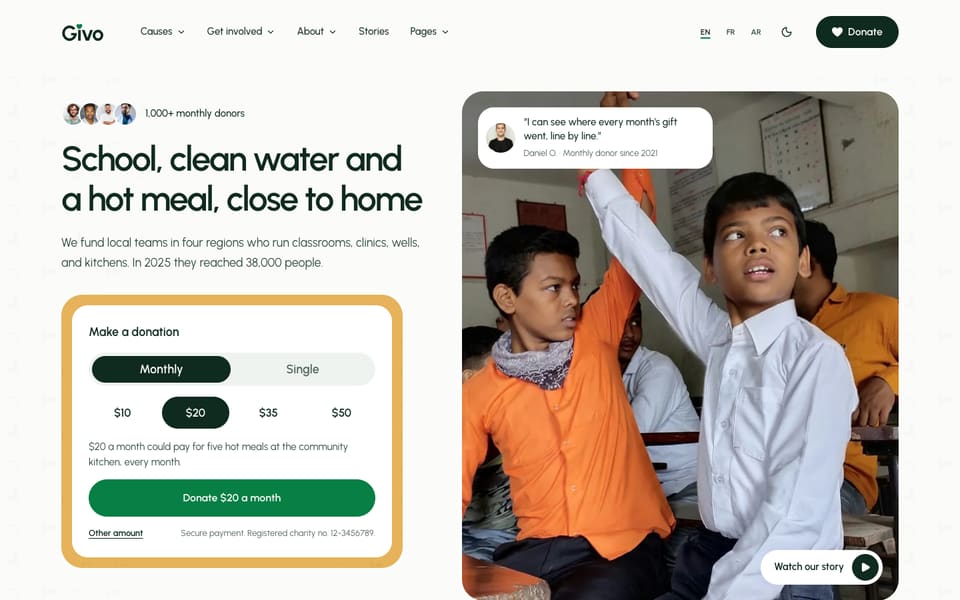
Most changes in Givo are edits to plain text files, not code: your organization details, text, photos, causes and their goals, donation amounts, events, buttons, menus, and the layout of every section that has more than one. Your organization name, registration number, phone, email, address, and office hours are set once and reused on every page. When you do want to change code, the theme ships instruction files that tell AI coding tools how it is built.
Givo comes in three editions: Astro, Tina, and Sanity. The design and pages are the same, and they differ in where your content lives and how you edit it. These docs show the files of the Astro edition. See [Theme Editions](/givo/features/editions/).
### What Is Included
- **3 homepages**: a multi-cause charity (`/`, the main homepage), a single emergency appeal (`/home-appeal/`), and a local community non-profit (`/home-community/`). Each one has its own header and footer layout
- **Causes**: a causes page with category filters and one page per cause, with its goal, the amount raised, the number of donors, the days left, updates, photos, and what each gift pays for. The demo has 9 sample causes
- **Donations**: a donate page with preset and custom amounts, one-time or monthly giving, a cause picker, an optional "cover the fees" line, gifts in honor or in memory of someone, monthly giving tiers, and an impact receipt that turns the amount into an outcome. A thank-you page follows the gift
- **Get involved**: events with one page per event and an add to calendar file (`.ics`), a volunteer page with roles and a sign-up form, a fundraise page with a toolkit and a sign-up form, and a tribute gifts page
- **About**: about, team (staff, board, and ambassadors), partners, impact and transparency with annual reports, supporter voices, a photo gallery with a lightbox, careers with one page per role, FAQ, and contact
- **Stories**: a blog with categories, tags, an author box, related posts, a table of contents, and an RSS feed
- **Legal**: privacy policy, terms, cookie policy, donation and refund policy, safeguarding policy, and a 404 page per language
- **Section layouts**: 34 section components. 15 of them, plus the page header, have 2 to 4 layouts each, chosen with one line. `/elements/` previews them all
- **Header and footer**: three header layouts (`default`, `centered`, `utility`) with a Causes mega menu, three footer layouts (`default`, `minimal`, `large`), and a **Donate** bar on phones
- **Languages**: English, French, and Arabic, with the whole layout mirrored on right-to-left pages. See [RTL & Arabic](/givo/features/rtl-arabic/)
- **Built in**: light and dark mode, organic background patterns you can turn off, figures that count up as they scroll into view, smooth scrolling, cookie consent, SEO (sitemap, `robots.txt`, structured data for a non-profit organization, events, articles, FAQ, and breadcrumbs, generated Open Graph images), `llms.txt` and Markdown copies of pages, Ask AI links, and forms that send to Formsubmit, Formspree, or Netlify Forms
### Choose Your Path
Every guide in these docs starts with the plain-language task, then shows the exact file and setting. Pick the path that matches how you like to work:
### The Files You Will Edit Most
This table shows the files. In the Tina edition you can edit them at `/admin/`, and in the Sanity edition most of this content is in the Studio. See [What Is Editable In Tina](/givo/features/what-is-editable-tina/) and [What Is Editable In Sanity](/givo/features/what-is-editable-sanity/).
| What you want to change | Where it lives |
| -------------------------------------------------------------- | ------------------------------------------------------ |
| Organization name, registration number, phone, email, address, office hours | `[organization]` in `src/config/config.toml` |
| Site name, URL, forms, header and footer layouts, switches | `src/config/config.toml` |
| Currency, donation amounts, monthly tiers, impact lines, and the payment connection | `src/content/donate/english/-index.md` |
| Causes, with their goal, amount raised, donors, and deadline | `src/content/causes/english/` |
| Events | `src/content/events/english/` |
| Header and footer links, the Causes mega menu | `src/config/menu..json` |
| Colors, type scale, and pattern strength | `src/styles/theme.css` |
| Fonts | `src/config/fonts.json` |
| Text and images of a section | `src/content/sections/english/` (and each other language folder) |
| Text and section settings of one page | `src/content//english/-index.md`, or `src/content/pages/english/.md` for single pages |
| Button labels, page-title tagline, and other small interface text | `src/i18n/.json` |
#### Links
- Layout gallery: every layout of the sections that have more than one, and the page header. In your copy, run `npm run dev` and open `http://localhost:4321/elements/`
- [Support](https://getastrothemes.com/contact/)