# Emergency Page & Specials
## Emergency Page & Specials
**Files:** `src/content/pages/english/emergency.md`, `src/content/pages/english/specials.md` (and each other language folder) · **Skill level:** Beginner
Two pages that most plumbing sites need: `/emergency/`, what to do while water is running and what an emergency visit covers, and `/specials/`, your current coupons and monthly payments for bigger jobs. Both are built only from existing sections, so every block below works like the blocks on other pages: objects merge key by key, lists replace the whole list, and `enable: false` hides a section. Change every language folder.
### The Emergency Page
Route: `src/pages/[...lang]/emergency.astro`. Content: `src/content/pages/english/emergency.md`. Sections, top to bottom:
| Section | Block | What it holds |
| --- | --- | --- |
| Page header, `split` | `pageHeader` | The description, a "What to do now" button that jumps to the steps, the phone as an outline call button (`phone.style: "button"`), and a photo |
| Before we arrive, `row` | `stepsSection` | Four steps: shut off the water, power and gas, drain the pipes, move things and take photos. `anchor: "before-we-arrive"` is the target of the header button |
| What we fix, `list` | `servicesSection` | The services an emergency visit covers (`services: [...]`, service ids in order) as one flat list, plus a "Not sure it's an emergency?" card (`customTile`) |
| Response promise, `default` | `metricsSection` | Four numbers: days a year the line is open, target arrival, arrival window, warranty |
| Emergency questions | `questionsSection` | The FAQ, with a call box (`callBox`) that shows the phone, hours, and open-now line from `[business]` |
| CTA band, `band` | `ctaSection` | "Not an emergency? Book a normal visit." with the phone beside the button |
The numbers in `metricsSection` are marked `# sample`: set your real arrival target and warranty. Keep the arrival window equal to the one in your terms (`src/content/pages/english/terms-conditions.md`).
The price of an emergency visit is not typed on this page. It comes from the `emergency-plumbing` rate card in `src/content/pricing/english/-index.md`: an hourly rate and a `callOutFee`, one rate at night, at weekends, and on holidays. The service page `/services/emergency-plumbing/` shows it. See [Pricing & Estimator](/plumbo/customization/pricing-estimator/).
#### Where Emergency Shows Up Elsewhere
- **The emergency band on the homepages.** On `/home-residential/` and `/home-water/`, the `ctaSection` block of the homepage file is an orange call band (`layout: "band"`, `phone: true`). On `/home-residential/` it sits after "How it works"; on `/home-water/` at the foot of the page. On `/`, the same block is the navy `panel` above the footer, with a book pill and a call pill (`phone: true`). Edit `title`, `description`, `button`, and `image` in `src/content/homepage/english/-index.md`, `home-residential.md`, or `home-water.md`. The number comes from `[business]` in `config.toml`.
- **The FAQ call box on `/home-residential/`.** `callBox` in the homepage's `questionsSection` ("Water where it shouldn't be? Call us now.").
- **The menus.** The **Emergency 24/7** group of the Services mega menu links to `/services/emergency-plumbing/` and `/emergency/`, and the footer has an **Emergency 24/7** link. Both are in each `src/config/menu..json`. See [Menus](/plumbo/customization/menus/).
### The Specials Page
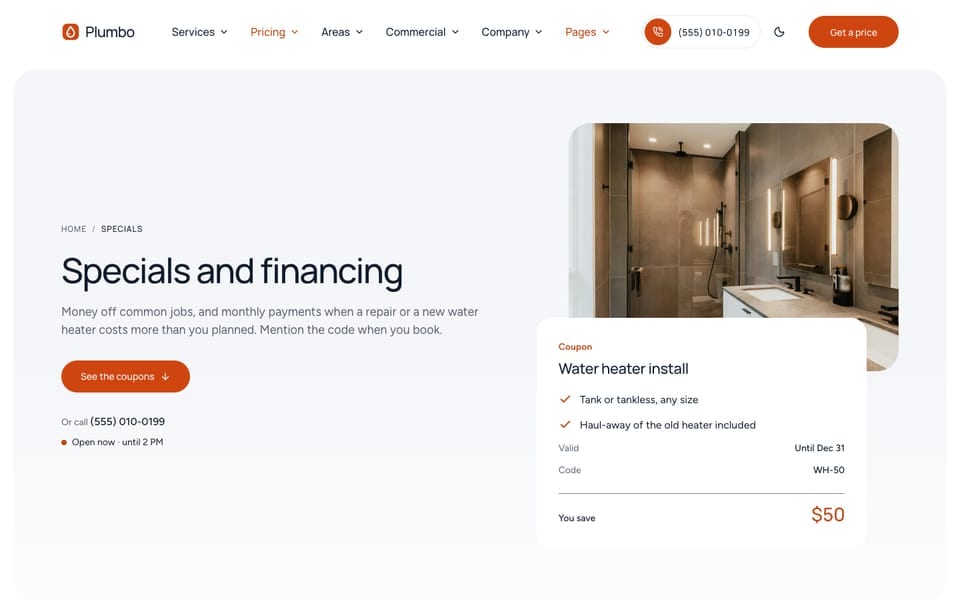
Route: `src/pages/[...lang]/specials.astro`. Content: `src/content/pages/english/specials.md`. Nothing is sold on this page: a visitor gives the coupon code when they book or call. Sections, top to bottom:
| Section | Block | What it holds |
| --- | --- | --- |
| Page header, `split` | `pageHeader` | The description, a "See the coupons" button, the phone line, a photo, and one coupon drawn as a dark ticket (`ticket`) |
| Current coupons, `default` | `plansSection` | One card per coupon (anchor `#coupons`) |
| Financing, `default` | `featureGridSection` | Four points and an "Ask about financing" button (anchor `#financing`) |
| How financing works, `row` | `stepsSection` | Four steps, from the written price to the work |
| Terms | `questionsSection` | Coupon and financing terms, with a call box |
| CTA band, `band` | `ctaSection` | "Not sure which offer fits? Call us." |
Every offer, code, date, and term on this page is a sample. Replace them before launch.
#### Edit A Coupon
Each coupon is a plan card with a `customPrice` text instead of a computed price, so it needs no rate card:
```yaml
# src/content/pages/english/specials.md
plansSection:
plans:
- name: "Water heater install"
customPrice: "$50 off" # any text: "Free", "10% off"
featured: false # true: the highlighted card
badge: "" # small label on the featured card, e.g. "Most used"
description: "On any new tank or tankless water heater we supply and fit."
features:
- "Code WH-50"
- "Tank and tankless"
- "Valid until Dec 31"
button:
enable: true
label: "Book an install"
url: "/book/?service=water-heater-repair&code=WH-50"
variant: "outline"
```
The button URL opens the booking form with the service chosen (`service=`, a rate-card id) and the code filled in (`code=`). The booking form has a **Coupon or referral code** field (`code` in `src/content/sections/english/booking-section.md`), and the code arrives with the request. Nothing checks or applies the code for you: you take it off the price yourself.
`plans` is a list, so it replaces the whole list: keep every coupon you want to show. Use the same price text and code in every language.
#### Expire Or Remove A Coupon
No date switches a coupon off by itself. When an offer ends:
1. **Delete its item** from `plans` in `specials.md`, in every language folder.
2. **Update the header ticket** if it shows that coupon: `pageHeader.ticket` holds its own code, rows, and `total` (the amount saved). Point it at another coupon, or delete the `ticket` block to show only the photo.
3. **Check the terms.** The questions in `questionsSection` mention "one coupon per job" and end dates. Keep them true.
To hide every coupon for a while, set `enable: false` in `plansSection`. To remove the page entirely, see [Pages](/plumbo/customization/pages/): delete the route and the content files, then remove the `/specials/` links listed below.
#### Turn Financing Off
If you don't offer payment plans, hide its two sections in `specials.md`, in every language:
```yaml
featureGridSection:
enable: false
stepsSection:
enable: false
```
Then remove the financing questions from `questionsSection.list`, change the page `title`, `metaTitle`, `metaDescription`, and `pageHeader.description` so they no longer promise monthly payments, and check these other places that mention financing:
- The FAQ page (`src/content/faq//-index.md`) and the terms (`src/content/pages//terms-conditions.md`) each have a financing answer or paragraph.
- The menus name the page **Specials and financing**: rename the items in each `src/config/menu..json`.
- The `large` footer has a specials box: `footer.giftTitle`, `footer.giftText`, and `footer.giftLink` in each `src/i18n/.json`.
If you do offer financing, name the lender only once you have one, and take the rates and terms from the lender's own documents.
#### Links To The Specials Page
`/specials/` is linked from the Pricing dropdown and the **Pages** menu in each `menu..json`, from the footer, from the box in the `large` footer, and from text in the FAQ, the terms, the cancellation policy, and the referral page. Search the project for `/specials/` before you rename or remove it.
### Maintenance Plans
Yearly maintenance plans are not on `/specials/`. They are the plan cards on `/pricing/` (`plansSection` in `src/content/pricing/english/-index.md`, anchor `#plans`), linked as **Maintenance plans** in the menus. See [Pricing & Estimator](/plumbo/customization/pricing-estimator/).
### Do It With AI
```text
Replace the sample coupons on /specials/ with mine: [LIST: name, price text, code, end date,
service]. Edit plansSection.plans in src/content/pages/english/specials.md (and the french and
arabic files), set each button URL to /book/?service=&code=, update the
pageHeader.ticket to the first coupon, and keep the terms in questionsSection true. Then run
npm run astro-check.
```
```text
I don't offer financing. On /specials/, set enable: false on featureGridSection and stepsSection
in src/content/pages//specials.md, remove the financing questions and wording, rename
the "Specials and financing" menu items in each src/config/menu..json to "Specials",
and update the financing answers in the FAQ and terms pages. Do every language, then run
npm run astro-check.
```