


Causes & Campaign Progress
Files: src/content/causes/<language>/ · Skill level: Beginner
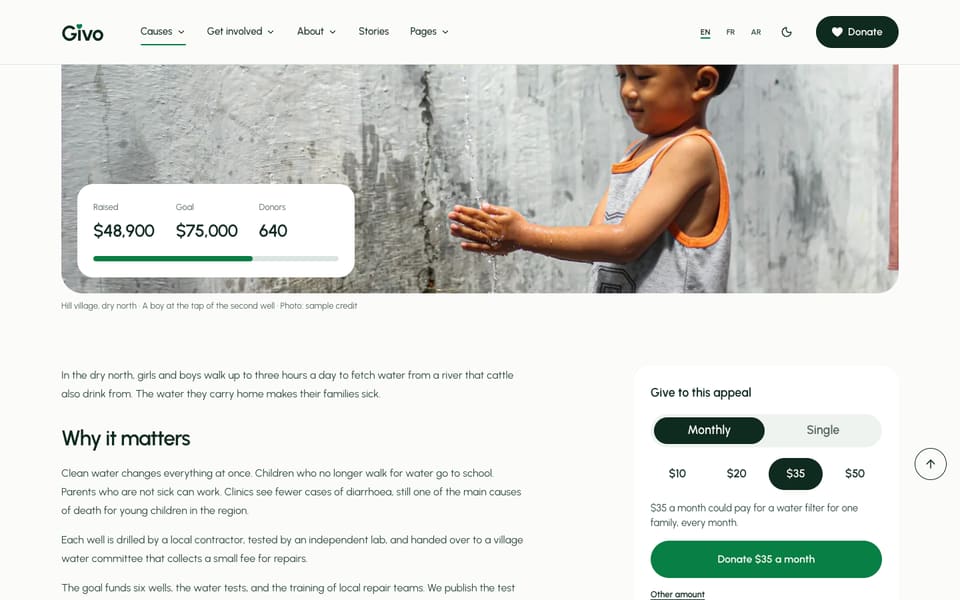
A cause is one appeal people can give to: clean water wells, a winter shelter, a flood appeal. Each cause is one Markdown file. From its numbers the theme draws the progress bar, the “raised of goal” line, the donor count, and how much time is left, on the cause card, the cause page, the homepage, and the Causes menu.
Where Causes Appear
| Where | What it shows |
|---|---|
/causes/ | Every cause, with category filters. The settings are in src/content/causes/<language>/-index.md |
/causes/<file-name>/ | One page per cause: photo, progress, story, photos from the field, updates, and a donation box |
| Homepage causes section | The causes listed in causesSection of src/content/homepage/<language>/-index.md |
| Causes menu | The links you add to the Causes mega menu in src/config/menu.<language>.json (see Menus) |
| Donation form | The “Where should it go?” list on /donate/ has one option per published cause |
| Fundraise form | The “Cause” list on /fundraise/ has one option per published cause |
A Cause File
The file name is the address: clean-water-wells.md becomes /causes/clean-water-wells/. A shortened sample:
---title: "Clean water wells"description: "Six new wells so that families in the dry north no longer walk three hours a day for water."image: "/images/photos/cause-water-tap.jpg"imageAlt: "A young boy reaching for water from a tap on a wall"imageCaption: "Hill village, dry north · A boy at the tap of the second well · Photo: sample credit" # samplecategory: "water" # id from `categories:` in -index.mdgoal: 75000 # sampleraised: 48900 # sampledonors: 640 # sampledeadline: 2027-04-30 # sample; remove for an ongoing causelocation: "Six villages in the dry north"featured: trueorder: 5gallery:  - image: "/images/photos/gallery-standpipe-tap.jpg"    alt: "A standpipe tap in a green field"impact:  - amount: 30    label: "a water filter for one family"updates:  - date: 2026-07-09    title: "Well number two is running"    text: "The second well passed its water test and now serves 380 people."draft: false---
The story of the cause, in Markdown.| Field | What it does |
|---|---|
title, description | The name and the one-line summary on cards and in search results |
image, imageAlt, imageCaption | The large photo, its description for screen readers, and the caption line under it |
category | An id from categories in the causes -index.md. It sets the label on the card and the filter the cause appears under |
goal | The amount you need, as a plain number in the donate currency. 0 or no goal shows no progress |
raised | The amount received so far, as a plain number |
donors | How many people gave |
deadline | The last day to give, YYYY-MM-DD. Remove the line for an ongoing cause |
location | Where the work happens, shown with the title |
featured | true puts the cause first on /causes/ and lets the homepage show it large |
order | Sort order, lowest first. Causes with the same order sort by title |
gallery | Photos from the field, in a grid on the cause page. Select one to open it full size |
impact | What a gift does: amount and label, with an optional Lucide icon. Shown in the donation box on the cause page |
updates | Dated news on the cause page: date, title, text |
draft | true hides the cause from the built site and every list |
Amounts are plain numbers with no currency sign and no commas. The currency is set once for the whole site in the donate file: see Donation Form. The theme formats each number for the page language, so 48900 shows as $48,900 in English and 48 900 $ in French.
How The Progress Is Worked Out
You type three numbers. The theme works out the rest when the site is built (src/lib/campaign.ts and src/lib/causes.ts):
- Percent funded is
raiseddivided bygoal, rounded down, and kept between 0 and 100. A cause that raised more than its goal shows a full bar, not 130%. - “$48,900 raised of $75,000” comes from
raisedandgoal. - The donor count uses the right plural for the language: “1 donor”, “640 donors”. See Plural Labels.
- Time left is counted in whole days from the build date to
deadline.
The Status Label
Each cause card and cause page shows one status. The first rule that matches wins:
| Status | When |
|---|---|
| Goal met | raised is equal to or more than goal |
| Ongoing | The cause has no deadline |
| Ended | The deadline day is over |
| Last day | Today is the deadline day |
| Ends in 12 days | Any other day before the deadline (“Ends in 1 day” the day before) |
A cause that has ended or met its goal stays online and still takes gifts. The page keeps its story and updates, and the donate button still works. To stop gifts to a cause, set draft: true, or remove it from the menus and lists and say on the page that it is closed.
The same rule applies to raised and donors: they are numbers you type, not live totals. Update them in the cause file (every language) when gifts come in, then rebuild.
Plural Labels
Counted labels come from src/i18n/<language>.json, in pairs:
"donors": "{count} donors","donorOne": "{count} donor","daysLeft": "{count} days left","dayLeft": "{count} day left"English and French need two forms. Arabic needs more: next to the plural key, ar.json has donors_two, donors_few, and donors_many (and the same for daysLeft). The theme picks the right form for the number and the page language (src/lib/plural.ts). A language with extra forms adds keys with the suffixes _zero, _two, _few, or _many; a missing form falls back to the plural key. npm run check-i18n accepts these extra keys.
Categories
Categories are listed once, in src/content/causes/<language>/-index.md:
categories: - id: "education" label: "Education" icon: "GraduationCap" order: 1 - id: "water" label: "Clean water" icon: "Droplets" order: 3idis what a cause file writes incategory. Keep the ids the same in every language; translate thelabel.iconis any Lucide icon name.ordersorts the filter buttons./causes/?category=wateropens the page with one category selected. Use it in menu links and buttons.
The same -index.md holds the page header, the causesSection block (layout and filter), the questions, and the closing call to action of /causes/.
The Causes Section
The causes cards on the homepage and on /causes/ are one section. Its defaults are in src/content/sections/<language>/causes-section.md; each page changes them with a causesSection: block:
causesSection: causes: ["clean-water-wells", "river-valley-flood-appeal", "winter-shelter-beds"] # file names, in this order; empty = every cause categories: [] # category ids; empty = every category featuredOnly: false # only causes with featured: true limit: 4 # 0 = every cause options: layout: "grid" # grid | featured | list featured: true # grid: the first featured cause large, the next ones as cards filter: false # category buttons above the cardsThe layouts are described in Section Layouts.
The Cause Page
Every cause page is built from the cause file plus two shared files:
src/content/sections/<language>/cause-hero-section.md: the label of the donate button (it opens/donate/?cause=<file-name>, with the cause already chosen), the share links (copy link and email, no third-party scripts), and the title of the donation box.- The donation box beside the story uses the preset amounts from the donate file and the cause’s own
impactlines.
A cause file can change any of these for itself with a causeHeroSection: block.
Photos in gallery open in a full-screen viewer: arrows or swipe to move, Esc to close, and a counter such as “3 of 4”. Without JavaScript, each photo is a plain link to the large file.
Add A Cause
-
Copy a cause file in
src/content/causes/english/and rename it. The new name is the address, so use lowercase words and dashes:school-meals.mdfor/causes/school-meals/. -
Change the fields: title, description, photo and its alt text,
category,goal,raised,donors, anddeadline(or removedeadline). Replace the story below the frontmatter. -
Copy the file to
french/andarabic/with the same file name, translate the text, and keep every number the same. -
Add a link to it in the Causes menu, in every
src/config/menu.<language>.json. See Menus. -
Run
npm run devand open/causes/and the new page.
To remove a cause, delete its file in every language folder and its menu link, or set draft: true to keep it for later. If the cause is named in causesSection.causes on the homepage, in cta.cause of the menu, or in a story’s cause field, update those too.
Do It With AI
Add a cause called [NAME] to my Givo site. Copy an existing file in src/content/causes/english/to [file-name].md and set title, description, category ([CATEGORY ID]), goal [GOAL], raised[RAISED], donors [DONORS], and deadline [YYYY-MM-DD or none]. Write a short story from these factsonly: [FACTS]. Create the same file in every other language folder with the text translated andthe numbers unchanged, and add its link to the Causes menu in every src/config/menu.<language>.json.Update the figures of my causes from this list: [CAUSE FILE NAME: raised, donors]. Change raisedand donors in src/content/causes/ in every language folder, keep every other field, and tell mewhich causes now show "Goal met".