


Homepages
Files: src/pages/[...lang]/index.astro, home-appeal.astro, home-community.astro, src/content/homepage/english/ · Skill level: Beginner to edit, light code to reorder
Givo has three homepages, one per kind of organization. They use the same sections with different content, layouts, header, and footer, so each one also shows which combination suits that kind of charity. Keep one as your homepage and delete the others, or keep a second one as a landing page for an appeal.
| Homepage | URL | Route file | Content file |
|---|---|---|---|
| Multi-cause charity (main) | / | src/pages/[...lang]/index.astro | src/content/homepage/english/-index.md |
| Single emergency appeal | /home-appeal/ | src/pages/[...lang]/home-appeal.astro | src/content/homepage/english/home-appeal.md |
| Local community non-profit | /home-community/ | src/pages/[...lang]/home-community.astro | src/content/homepage/english/home-community.md |
Each content file has a copy in each other language folder, such as src/content/homepage/french/. The Homepages group of the Pages menu links to all three. The two extra homepages ship with robots: "noindex, follow" and excludeFromSitemap: true, so search engines don’t index them.
All the figures on the homepages (people reached, amounts raised, the spending split) are samples. They are marked # sample in the content files: replace them with your own.
Multi-Cause Charity (Main Homepage)
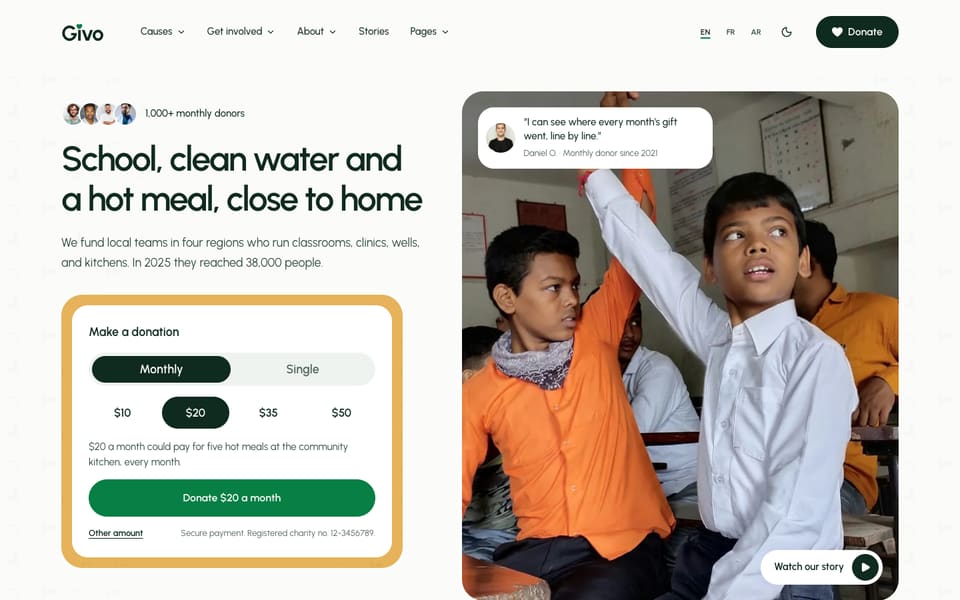
For a charity with several programs. The hero puts a quick donation form beside one large photo, and the page walks through your work, your appeals, and where the money goes.
Sections, top to bottom, with the layout set in -index.md:
- Hero,
photo: the title, supporter faces, and the quick donation widget beside a large photo (heroSection) - Numbers,
cards: solid stat cards (metricsSection) - Our work,
focus: photo tiles (featureGridSection) - Current appeals,
grid: four causes with their progress (causesSection) - One supporter’s story,
story: a quote on a full-width photo (reviewsSection) - Where your money goes,
bar: one stacked bar and a legend (giftSplitSection) - Latest stories,
news: the newest story large beside dated rows (relatedPostsSection) - Upcoming events,
list(eventsSection) - Get involved,
focus: three photo columns (involvedSection, a second feature grid) - Partners,
plain: a row of partner logos (clientsSection)
Header default, footer default. The closing band is off on this page (ctaSection with enable: false), because “Get involved” does its job.
Single Emergency Appeal
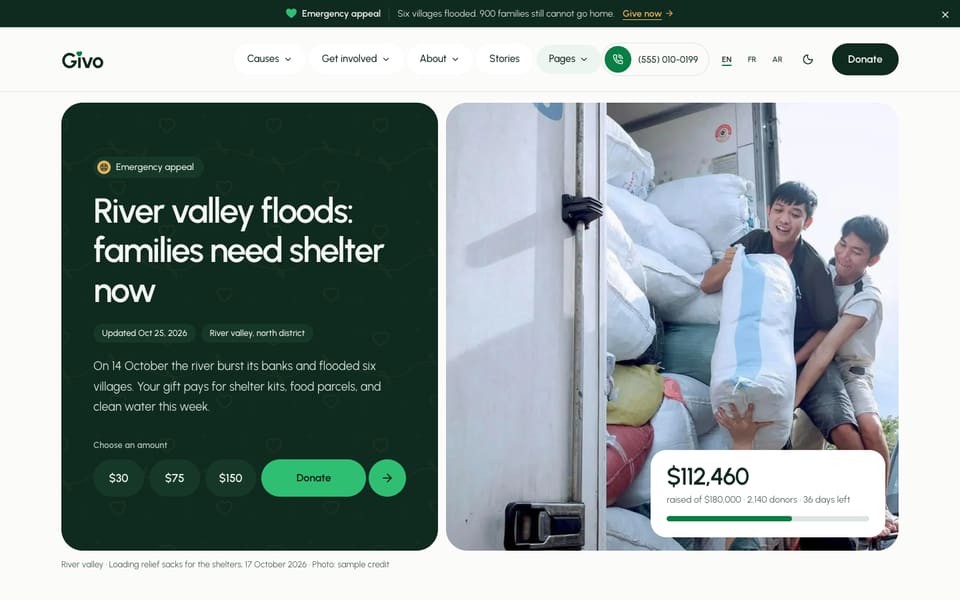
For one urgent appeal, such as a flood or an earthquake. An announcement bar above the header, a solid forest hero with the live total and amount buttons beside a large photo, then what happened, the dated updates, and how the money is spent. The figures and the timeline come from one cause, river-valley-flood-appeal.
- Hero,
appeal(heroSection) - What happened,
split: the story and facts beside a needs table (appealBriefSection) - Updates,
timeline: a dated list, newest first (appealUpdatesSection) - How the appeal is spent,
bar(giftSplitSection) - Partners,
plain(clientsSection) - One quote,
overlay: a quote card on a photo (reviewsSection) - Questions,
grid(questionsSection) - Closing band,
donate: the live total and amount buttons, above the footer (ctaSection)
Header centered, footer minimal, and the announcement bar turned on by the page’s announcementBar: block.
Local Community Non-Profit
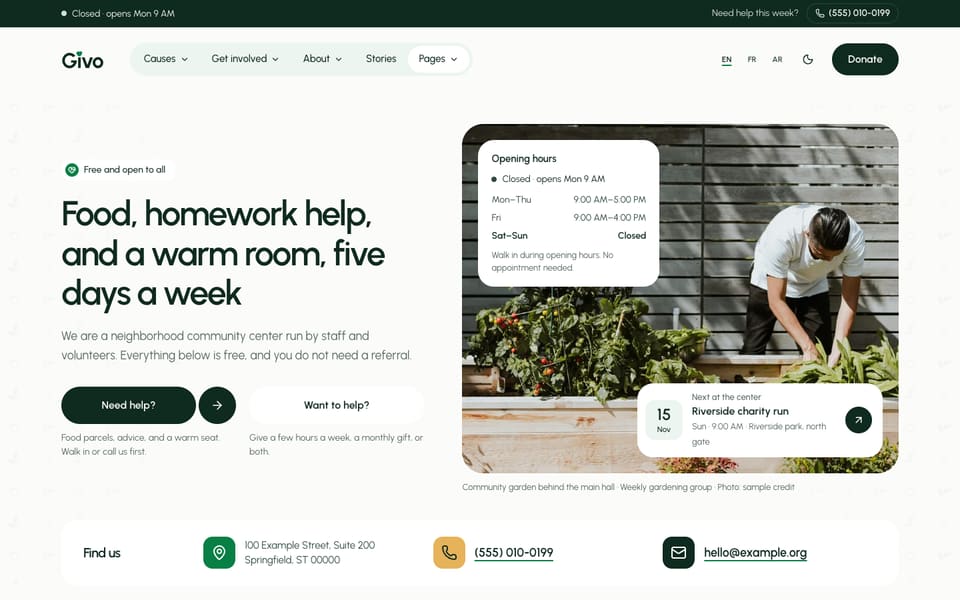
For a food bank, a youth club, or a community center people visit. A forest strip with the “open now” line and your phone, a hero with two paths (get help, give help), and the services, events, and roles of the week.
- Hero,
community: two path buttons and a photo, then opening hours, the next event, and how to find you (heroSection) - Get help,
schedule: service rows with times and places (featureGridSection) - What’s on,
agenda: events grouped by month (eventsSection) - Volunteer roles,
list(volunteerRolesSection) - Numbers,
cards(metricsSection) - Photos,
strip(gallerySection) - Monthly giving,
compact: the tiers in one card (plansSection) - Quotes,
default: three quotes in a row (reviewsSection) - Newsletter (
newsletterSection) - Closing band,
volunteer, above the footer (ctaSection)
Header utility, footer large (with the office hours one row per day).
Edit A Homepage
Each section of a homepage reads its named block in the homepage’s content file, such as heroSection: or causesSection:. A block only needs the fields it changes: everything else comes from the section’s own file in src/content/sections/english/. See Sections for how blocks merge.
# src/content/homepage/english/-index.md (trimmed)causesSection: # defaults: causes-section.md (cards from src/content/causes/) enable: true title: "Current appeals" causes: ["clean-water-wells", "river-valley-flood-appeal", "winter-shelter-beds", "school-supplies-for-every-child"] limit: 4 options: layout: "grid" # grid | featured | listenable: falsehides a section on this page.options.layoutpicks the section’s look. The values are in the comment beside it. See Section Layouts.- Make the same change in each other language folder.
Reorder The Sections
The order on the page is the order in the route file. Open src/pages/[...lang]/index.astro:
<Base {...homepageContent?.data} className="givo-home" footerSpaceTop={false} layoutSwitcher> <LayoutVariants section="hero" content={heroSection} /> <LayoutVariants section="metrics" content={metricsSection} /> <FeatureGridSection content={featureGridSection} /> <LayoutVariants section="causes" content={causesSection} /> <LayoutVariants section="reviews" content={reviewsSection} /> <div class="home-soft"> <GiftSplitSection content={giftSplitSection} /> </div> <RelatedPostsSection content={relatedPostsSection} /> <div class="home-soft"> <EventsSection content={eventsSection} /> </div> <FeatureGridSection content={involvedSection} /> <Clients content={clientsSection} /></Base>Move a line up or down to move the section. Delete a line to remove it, or set enable: false in its block instead. <div class="home-soft"> puts a section on a soft mint-grey band; keep two soft bands apart.
Keep the <LayoutVariants section="..." content={...} /> wrapper on the sections that use it (hero, metrics, causes, reviews, events, plans, FAQ, donate, steps, closing band). It renders the layout you set in options.layout. Replacing it with the section component itself still works, but leaves the section out of the demo layout switcher.
Use Another Homepage As Your Homepage
-
Copy the route. Replace the contents of
src/pages/[...lang]/index.astrowith the contents of the homepage you want, for examplehome-community.astro. In the copied code, change the entry name from"home-community"to"-index":const entry = await getEntryCTM("homepage", "-index", Astro.currentLocale); -
Copy the content. Replace the frontmatter of
src/content/homepage/english/-index.mdwith that ofhome-community.md. Then delete therobotsandexcludeFromSitemaplines, and settitle: ""so the page uses your site title. Do the same in the other language folders. -
Delete the homepages you don’t keep: the route files in
src/pages/[...lang]/and the content files in every language folder ofhomepage/. -
Update the menus. Remove the deleted homepages from the Homepages group of the Pages menu in every
menu.<language>.json, or turn the whole Pages menu off. -
Check it. Run
npm run astro-checkand open/,/fr/, and/ar/.
Header And Footer Per Homepage
Each homepage picks its header and footer in its content file. They win over [settings.layout] in config.toml:
| Homepage | headerLayout | footerLayout |
|---|---|---|
/ | (site default: default) | (site default: default) |
/home-appeal/ | centered | minimal |
/home-community/ | utility | large |
When you copy a homepage into -index.md, these lines come with it. Delete them to use the site defaults. See Header and Footer.
Do It With AI
On the main homepage (src/pages/[...lang]/index.astro), move the [SECTION] line above the[SECTION] line and remove the [SECTION] line. Then rewrite the text of the hero and causesblocks in src/content/homepage/english/-index.md for my organization: [ONE PARAGRAPH]. Keepevery key, option, and list length, and keep the "# sample" marks on figures I haven't givenyou. Do the other language files too.Make the /home-[appeal | community]/ design my homepage. Replacesrc/pages/[...lang]/index.astro with the contents of home-[NAME].astro, reading the "-index"entry. Copy the frontmatter of src/content/homepage/english/home-[NAME].md into -index.md(same for the other language folders), remove robots and excludeFromSitemap, and set title to "".Delete the other homepage routes and content files, remove them from the Homepages group ineach src/config/menu.<language>.json, and run npm run astro-check.