


Menus
Files: src/config/menu.<language>.json · Skill level: Beginner
The header menu and the footer link columns live in one JSON file per language: menu.en.json, menu.fr.json, and menu.ar.json. Keep the files in the same shape: same items, same order, same URLs. Only the name and label texts differ.
Each file has two lists:
{ "headerPrimary": [ ... ], "footer": [ ... ]}For how the menu behaves on screen and with the keyboard, see Navigation.
Header Menu
Each item in headerPrimary is one entry in the top menu. There are three kinds of item.
A plain link. Stories is one:
{ "enable": true, "name": "Stories", "weight": 4, "url": "/blog/" }A dropdown. Set "hasChildren": true and list the links in children. This is the Get involved menu, trimmed:
{ "enable": true, "name": "Get involved", "weight": 2, "hasChildren": true, "children": [ { "enable": true, "name": "Volunteer", "url": "/volunteer/", "weight": 1 }, { "enable": true, "name": "Fundraise", "url": "/fundraise/", "weight": 2 }, { "enable": true, "name": "Events", "url": "/events/", "weight": 3 } ]}A mega menu. Set "hasMegaMenu": true and list groups of links in menus. The Causes menu is one: see The Causes Mega Menu below.
| Key | What it does |
|---|---|
enable | false hides the item without deleting it |
name | The text in the menu |
weight | A position number. The menu shows items in the order of the file, so move an item in the file to move it in the menu |
url | Where it links. Write paths without the language: /causes/, not /fr/causes/. The other languages add their prefix themselves. An item with children has no url |
hasChildren | true makes the item a dropdown |
children | The links inside the dropdown. A child with its own hasChildren and children opens a flyout |
hasMegaMenu | true makes the item a mega menu |
menus | The columns of a mega menu, each with enable, name, weight, and children. The name is a small heading, not a link |
cta | The card beside the columns of a mega menu |
bar | The row along the bottom of a mega menu, with enable, text, label, and url |
The Causes Mega Menu
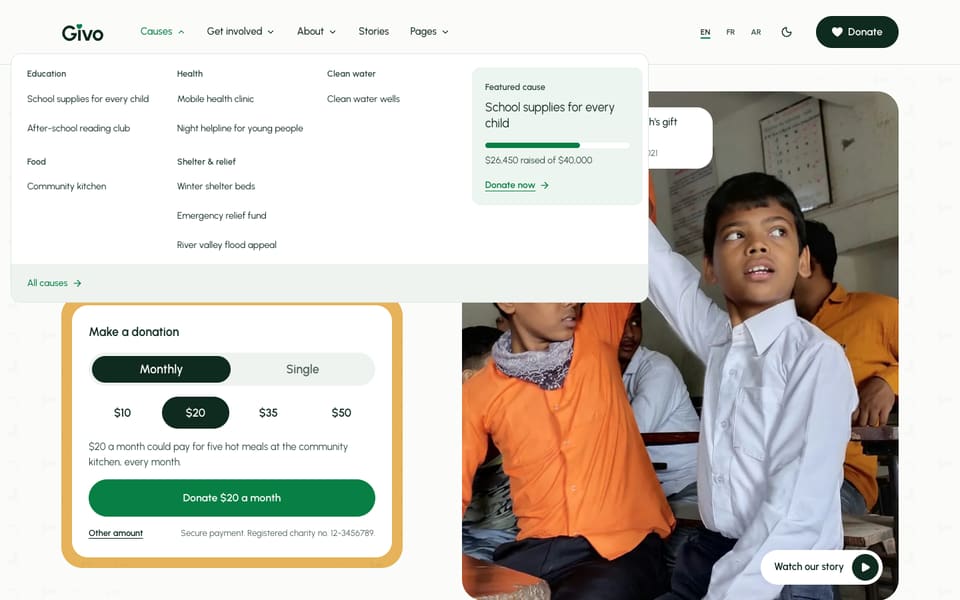
Causes has one column per cause category, a card for one featured cause, and an All causes row. Trimmed:
{ "enable": true, "name": "Causes", "weight": 1, "hasMegaMenu": true, "menus": [ { "enable": true, "name": "Education", "weight": 1, "children": [ { "enable": true, "name": "School supplies for every child", "description": "", "icon": "", "url": "/causes/school-supplies-for-every-child/", "weight": 1 }, { "enable": true, "name": "After-school reading club", "description": "", "icon": "", "url": "/causes/after-school-reading-club/", "weight": 2 } ] } ], "cta": { "enable": true, "eyebrow": "Featured cause", "cause": "school-supplies-for-every-child", "image": "", "title": "", "description": "", "items": [], "button": { "enable": true, "label": "Donate now", "url": "/donate/?cause=school-supplies-for-every-child" } }, "bar": { "enable": true, "text": "", "label": "All causes", "url": "/causes/" }}- The columns are plain links. The column names match the cause categories, but the menu doesn’t read them: you write each link yourself.
cta.causeis the id of a cause: its file name insrc/content/causes/<language>/without.md. The card then shows that cause’s title (linked to its page), a thin progress line, and ”$… raised of $…”, read from the cause file when the site is built.titlereplaces the cause’s title;eyebrow,description, a shortitemschecklist, and animageare optional. Withoutcause, the card shows only what you write.cta.buttonis the button at the bottom of the card. Point it at/donate/?cause=<id>so the donation form opens with that cause chosen."enable": falseonctahides the whole card.baris the row along the bottom: an optional line oftext, and a link (label,url).
To feature another cause, change cause and the cause id in the button’s url, in every language file.
Flyouts
A child that has its own hasChildren and children opens a flyout to the side, and it flips if there is no room. The Pages menu uses this to list every page of the theme:
{ "enable": true, "name": "Pages", "weight": 5, "hasChildren": true, "children": [ { "enable": true, "name": "Homepages", "weight": 1, "hasChildren": true, "children": [ { "enable": true, "name": "Main homepage", "url": "/", "weight": 1 }, { "enable": true, "name": "Urgent appeal", "url": "/home-appeal/", "weight": 2 }, { "enable": true, "name": "Community charity", "url": "/home-community/", "weight": 3 } ] } ]}You can nest as deep as you like. On phones, the same levels open as lists inside the mobile menu.
Footer Menus
footer is a list of link columns. Each has a label (the column heading) and a list of links:
"footer": [ { "label": "Give", "list": [ { "enable": true, "name": "Donate", "url": "/donate/" }, { "enable": true, "name": "Monthly giving", "url": "/donate/#monthly" } ] }, { "label": "Legal", "list": [ { "enable": true, "name": "Terms", "url": "/terms-conditions/" }, { "enable": true, "name": "Privacy policy", "url": "/privacy-policy/" }, { "enable": true, "name": "Cookie settings", "url": "#cookie-settings" } ] }]The shipped file has four columns: Give, Get involved, About, and Legal.
- The last column holds the legal links. Every footer layout shows it in its bottom row, next to the copyright, instead of as a column. Keep Legal last.
- The
defaultandlargefooters show every other column. Theminimalfooter shows the first two. See Footer.
The Cookie settings link (#cookie-settings) reopens the cookie banner. If you turn the banner off in [settings.cookieConsent], set this item’s enable to false.
Keep Every Language In Step
npm run check-i18n (also part of npm run astro-check) compares each language’s menu file with menu.en.json and reports a difference in the number of items or a url. So when you add, remove, or move a menu item, do it in every file.
JSON is strict: every item but the last in a list needs a comma after it, and every name and URL needs double quotes. A missing comma stops the site from building. See File Formats.
Do It With AI
In each src/config/menu.<language>.json: set "enable": false on the "Pages" item inheaderPrimary, and add a "Gallery" link to /gallery/, translated, at the end of the Aboutdropdown. In the Causes mega menu, add a link to /causes/[CAUSE ID]/ named "[TITLE]" (translated)to the [CATEGORY] column, and set cta.cause and the cta button's ?cause= to "[CAUSE ID]". Keepevery file in the same structure and the Legal footer column last, then run npm run check-i18n.