


Header & Mobile Donate Bar
Files: src/config/config.toml, src/config/menu.<language>.json, src/i18n/<language>.json, src/content/sections/english/announcement-bar.md, page frontmatter · Skill level: Beginner
Every header has the wordmark, the menu with its Causes mega menu and its dropdowns, the language codes, the light/dark button, and one main button (Donate). On phones the menu folds into a menu button, and a bar with a short line and the Donate button sits at the bottom of the screen. Givo has three header layouts and an optional announcement bar above them.
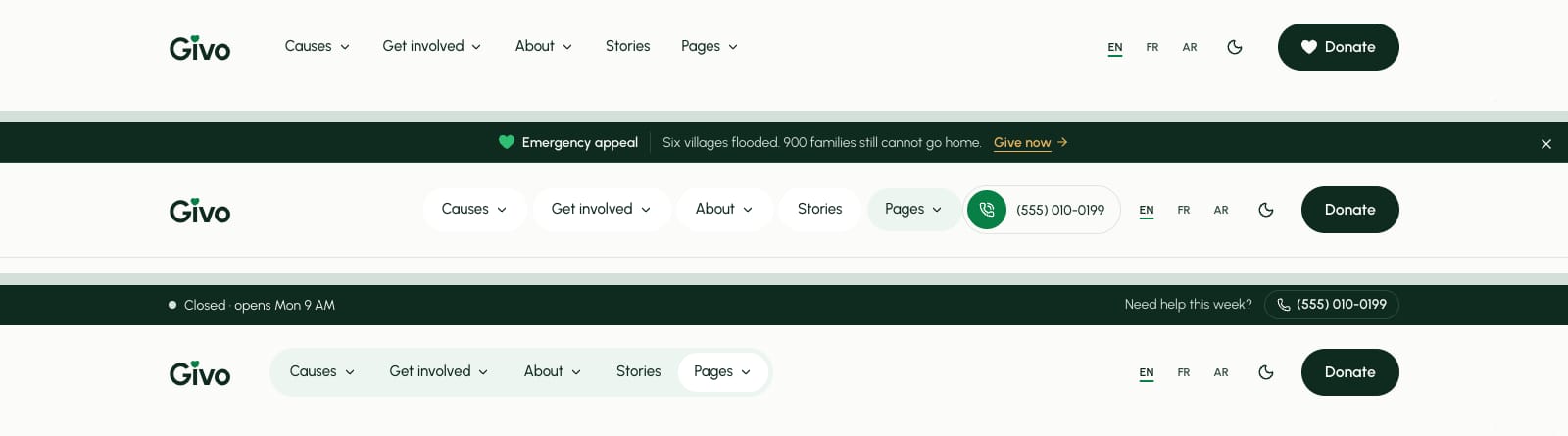
Choose A Header Layout
[settings.layout] # default | centered | utility header = "default"| Layout | What it looks like | Demo page |
|---|---|---|
default | Wordmark, the menus with their dropdowns, the language and theme switches, and the Donate button at the end. Used by the main homepage and the inner pages | / |
centered | The menus centered on a ruled bar, your phone number, and the Donate button | /home-appeal/ |
utility | A solid forest strip with the “open now” line, “Need help this week?”, and your phone number, above the main bar | /home-community/ |
One page, another layout. Add headerLayout to the page’s frontmatter. It wins over [settings.layout] header:
---title: "Winter food drive"headerLayout: "utility" # default | centered | utility---The two extra homepages set their own this way (src/content/homepage/english/home-appeal.md and home-community.md, and the same files in each other language folder). A misspelled value is caught by npm run astro-check in files with a schema.
The utility strip’s words come from utilityBar.help (“Need help this week?”) and utilityBar.label in src/i18n/<language>.json. Its “open now” line reads [organization.hours] and timezone. The strip and the announcement bar scroll away; only the main bar stays pinned.
The Menu
The header menu is plain data: the headerPrimary list in src/config/menu.<language>.json. Givo ships five items, in this order: Causes, Get involved, About, Stories, and Pages. Menus explains every kind of item, and Navigation explains how the menu behaves.
- Causes is a mega menu: one column of links per cause category (Education, Health, Clean water, Food, Shelter & relief), a card for one featured cause with its progress, and an All causes row along the bottom. You write these links yourself, so when you add a cause, add its link here in every language.
- Get involved is a dropdown: Volunteer, Fundraise, Events, Tribute gifts, and Partners.
- About is a dropdown: About us, Our impact, Team, Careers, Testimonials, FAQ, and Contact.
- Stories is a plain link to
/blog/. - Pages lists every page of the demo, with flyouts that open to the side. Hide it on your site with
"enable": falsein every menu file.
The Phone Number
The centered layout shows a round phone button that calls [organization] phone, with phoneDisplay beside it from 1320 px wide. The utility layout shows the number in its forest strip instead, and the default layout shows no phone. The number is hidden when phone is empty. See Organization Info.
The Donate Button
[settings.navigationButton] enable = true label = "" # i18n `navigation.buttonLabel` ("Donate"); a value here replaces it in every language url = "/donate/" # hidden on this page itself; the mobile action bar uses the same buttonTo change the words, edit navigation.buttonLabel in each language file, such as src/i18n/en.json (“Donate”) and src/i18n/fr.json. The button is hidden on the page it links to, so /donate/ doesn’t show a button to itself. To send donors to one cause first, point url at /donate/?cause=<cause-id>: see Donation Form.
A text link before the button. [settings.navigationSecondaryLink] adds a plain link (“Contact”) before the button in the default and centered layouts. It ships off:
[settings.navigationSecondaryLink] enable = false label = "" # navigation.secondaryLabel ("Contact") url = "/contact/"Sticky Header
[settings] stickyHeader = true # Keeps the header pinned while scrolling (the announcement bar scrolls away)With true, the header stays at the top while you scroll, and a thin line appears under it once the page moves. false lets it scroll away with the page.
The Announcement Bar
A thin bar above the header for a live appeal, with a short label, the message, one link, and a close button. It ships off on every page except the emergency appeal homepage, which turns it on with an announcementBar: block in its own frontmatter. Turn it on for every page in src/content/sections/english/announcement-bar.md (and each other language folder):
---enable: false # Show the bar above the header on every pageid: "flood-appeal-2026" # Change it when the message changes: visitors who closed the old one see the new onelabel: "Emergency appeal" # short label before the message; empty hides ittext: "Families in the river valley need shelter and food this week." # Sample message: replace it or turn the bar off. Inline markdown and {phone} worklink: enable: true # One link, shown after the text label: "Give now" url: "/donate/?cause=river-valley-flood-appeal"dismissible: true # Visitors can close it; the choice is kept in their browserstart: "" # Optional first day, YYYY-MM-DDend: "" # Optional last day, YYYY-MM-DD; also checked in the browser on old buildshideOn: ["/donate/"] # Path prefixes where the bar stays hidden (no language prefix)tone: "ink" # ink | mist----
tone:inkis a forest line with a green heart before the label,mista soft light line without the heart. -
startandendshow the bar only between those dates.endis also checked in the visitor’s browser, so an old build doesn’t show an appeal that has ended. -
One page only. Leave
enable: falsehere, and add anannouncementBar:block to the page’s frontmatter. It only needs the fields it changes, assrc/content/homepage/english/home-appeal.mdshows:announcementBar:enable: truelabel: "Emergency appeal"text: "Six villages flooded. 900 families still cannot go home."link:enable: truelabel: "Give now"url: "/donate/?cause=river-valley-flood-appeal" -
The text is a sample: replace it, or keep
enable: false.
The Mobile Menu
Below 1024 px wide, the menu links fold into a menu button at the end of the header. It opens a panel with the wordmark and a close button, the menu items (dropdowns and the Causes mega menu open as lists inside the panel), and, pinned to the bottom, the Donate button (with a call button on the layouts that show the phone), the language links, and the light/dark button.
The Mobile Donate Bar
On phones (below 768 px), a bar is fixed to the bottom of the screen with a short line and the Donate button, so a visitor can give from anywhere on the page.
[settings.mobileActionBar] enable = true hideOn = [ "/donate/", ] # Path prefixes where the bar is not rendered (language prefix ignored) hideNearFooter = true # Slide away while the footer is visible- The button is the header’s (
[settings.navigationButton]). The line beside it ismobileBar.lineinsrc/i18n/<language>.json(“Give once or monthly. Secure payment.”). hideOnleaves the bar out on pages that already are the action."/donate/"also covers/donate/thanks/, and/fr/donate/and/ar/donate/in the other languages.- The bar also slides away while a form field has focus, and while the menu or a dialog is open. The cookie banner and the back-to-top button sit above it.
Files For Developers
In src/layouts/components/global/header/: Header.astro picks the layout and adds the announcement bar and the utility strip, SiteHeader.astro draws the bar, UtilityBar.astro is the forest strip, Navbar.astro, MenuItem.astro, and the NavStage files are the desktop menu and its shared panel, and DropdownMenu.astro and MegaMenu.astro are the submenus in the mobile menu. The mobile menu itself is widgets/Offcanvas.astro and widgets/HeaderOffcanvasContent.astro, and the announcement bar is widgets/AnnouncementBar.astro, under src/layouts/components/. The bottom bar is src/layouts/components/global/MobileActionBar.astro, and the styles are in src/styles/navigation.css.
Do It With AI
Set the header to the [default | centered | utility] layout in [settings.layout] ofsrc/config/config.toml, and list the page files that set their own headerLayout. Change theheader button: url "[URL]" in [settings.navigationButton], and navigation.buttonLabel ineach file in src/i18n/ to "[LABEL]", translated. Keep the label short enough for the mobiledonate bar.Turn on the announcement bar for our appeal: in announcement-bar.md, in every language folderof src/content/sections/, set enable: true, label "[LABEL]", text "[TEXT]", the link"[LABEL]" to /donate/?cause=[CAUSE ID], end "[YYYY-MM-DD]", and a new id.