


Donation Form
Files: src/content/donate/<language>/-index.md, src/content/sections/<language>/donate-section.md · Skill level: Beginner
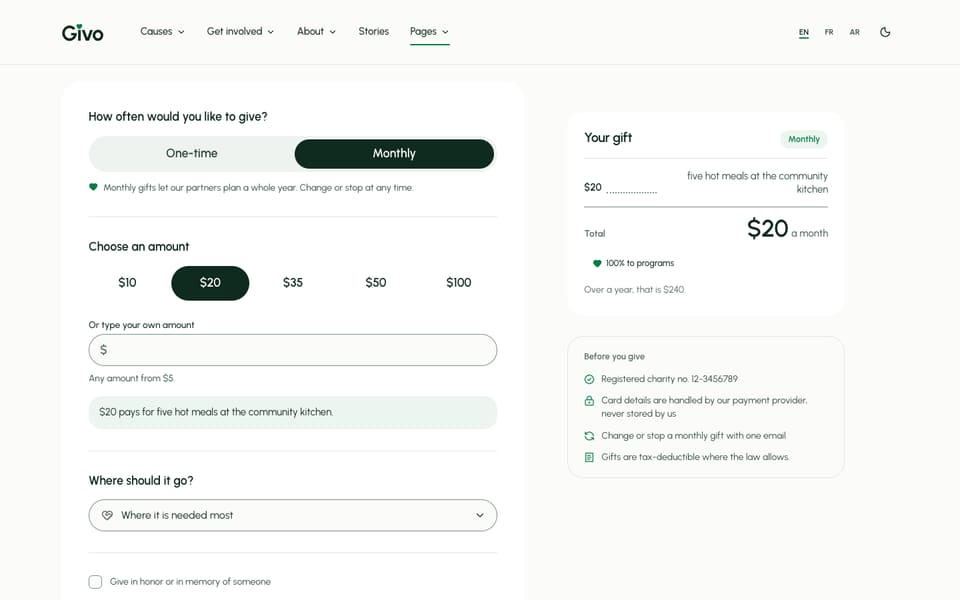
The donation form on /donate/ lets a donor choose one-time or monthly, pick an amount or type their own, choose a cause, give in honor or in memory of someone, cover the card fees, and enter their name and email. A receipt beside the form shows what the gift pays for.
Two Files
| File | What it holds |
|---|---|
src/content/donate/<language>/-index.md | The giving data: currency, preset amounts, frequencies, minimum, card fees, the impact list, the monthly tiers, and where the form sends. Also the page header and the other blocks of /donate/ |
src/content/sections/<language>/donate-section.md | The words on the form: labels, hints, the tribute option, the button text, the receipt titles, and the fine print beside the form |
Keep every number in the donate file the same in every language. The text can differ. npm run build prints a [donate] warning that lists each number that differs from the default language.
Currency And Amounts
currency: "USD" # ISO 4217 code, one currency for every languageamounts: oneTime: [25, 50, 100, 250, 500] # preset buttons, one-time monthly: [10, 20, 35, 50, 100] # preset buttons, monthlydefault: oneTime: 50 # preselected one-time amount monthly: 20 # preselected monthly amountminimum: 5 # smallest custom amountcurrencyis a three-letter code:"EUR","GBP","CAD","AUD". It is the currency of every amount on the site: the form, the cause goals and totals, event prices, and the impact page. Amounts everywhere are plain numbers in this currency.amountsare the preset buttons for each frequency. A donor can always type another amount, fromminimumup.defaultis the button selected when the form opens.npm run astro-checkfails on an emptyamountslist, a negative amount, or acurrencythat is not three letters.
Each page formats the amounts for its language: $50 in English, 50 $ in French, and Western digits in Arabic.
One-Time And Monthly
frequencies: - id: "one-time" label: "One-time" - id: "monthly" label: "Monthly" default: trueThe form opens on the frequency marked default: true (monthly in the sample). Keep the ids one-time and monthly; translate the label. With monthly selected, the button reads “Donate $20 monthly” and the receipt adds a line such as “Over a year, that is $240.”
Cover The Card Fees
coverFeesPercent: 3 # "Add 3% to cover the card fees" checkbox; 0 hides itWhen the donor ticks the box, the percentage is added to the gift and the total on the button and receipt includes it. Set the percentage your provider charges, or 0 to hide the line. The wording is coverFees and feesLine under form: in donate-section.md.
Gifts In Honor Or In Memory
The tribute block under form: in donate-section.md adds an option: “Give in honor or in memory of someone”. The donor picks In honor of or In memory of, types the person’s name, and can add an email of someone to tell.
tribute: # remove the block to hide the tribute option toggle: "Give in honor or in memory of someone" honor: "In honor of" memory: "In memory of" nameLabel: "Their name" notifyLabel: "Email to tell someone (optional)" notifyHint: "We send a short card that does not show the amount."These answers are sent with the gift as the fields tribute, tributeType, tributeName, and tributeNotify. The theme does not send the card itself: you, or your donation platform, send it from what you receive. Change notifyHint if you send something else. Remove the whole tribute block, in every language, to hide the option.
The /tribute/ page explains tribute gifts and holds a second copy of the form with the option already ticked. Its text is in src/content/pages/<language>/tribute.md: preset: "honor" or "memory" under tributePage sets which type is ticked.
Fill The Form From A Link
Any link to a page with the form can choose its starting values:
| Link | Opens the form with |
|---|---|
/donate/?amount=100 | $100 selected (or typed into the custom amount) |
/donate/?frequency=monthly | Monthly selected |
/donate/?cause=clean-water-wells | That cause chosen in “Where should it go?” |
/tribute/?tribute=memory | The tribute option ticked, set to “In memory of” |
Combine them with &: /donate/?frequency=monthly&amount=35#give. #give scrolls to the form. The cause pages, the homepage quick form, the monthly tiers, and the Causes menu use these links already.
Other Form Text
Everything else the donor reads is under form: in donate-section.md: the legends, the custom amount label, the impact line ("{amount} pays for {outcome}."), the cause label and its first option (“Where it is needed most”), the name, email, and country fields, the “keep my name off the list” and newsletter checkboxes, the consent line, and the button ("Donate {amount}").
- An empty value hides several of them:
countryLabel,anonymous,newsletter,monthlyNote,impactLine, andcoverFees. stamp: "100% to programs"is a sample stamp on the receipt. Keep it only if it is true for your charity.- The fine print beside the receipt is
aside.list.{registration}is your registration number from[organization]inconfig.toml, and the tax line comes fromorganization.taxNoteinsrc/i18n/<language>.json(taxNote = falsein[organization]hides it).
Error messages (“Enter your email so we can send your receipt.”) are under donateForm in src/i18n/<language>.json.
Connect A Payment Provider
The form block of the donate file chooses how a gift is sent:
form: mode: "form" # form | redirect endpoint: "" method: "post" # post | get processorUrl: "" # redirect mode, for example "https://checkout.example.org/donate?amount={amount}&interval={frequency}" thanksUrl: "/donate/thanks/"mode: "form" sends every field of the form to endpoint with method. Use it when your payment provider or donation platform gives you a form address that takes the amount, frequency, and donor details, and then shows its own payment step.
form: mode: "form" endpoint: "https://your-provider.example/forms/your-form-id" method: "post" thanksUrl: "/donate/thanks/"The fields sent are frequency, amount (or otherAmount), total, currency, cause, coverFees, the tribute fields, name, email, country, anonymous, and newsletter. Set your provider to send donors to thanksUrl after payment.
mode: "redirect" sends the donor to processorUrl, a checkout page hosted by your provider. Put {amount}, {frequency}, and {cause} where the provider expects them, and the form fills them in:
form: mode: "redirect" processorUrl: "https://checkout.example.org/donate?amount={amount}&interval={frequency}&ref={cause}"{amount} is the total, fees included. {frequency} is one-time or monthly. Without any of these markers, the form fields are added to the address as a query string. Check your provider’s documentation for the names it expects.
Until endpoint (or processorUrl in redirect mode) is set, the form shows a notice while you run npm run dev, and pressing the button on the live site shows “Online giving is not connected yet, so nothing was sent.” Send one real gift on the live site after you connect it.
The Thank-You Page
/donate/thanks/ is where donors land after a gift (thanksUrl). Its text is donateThanks in src/content/pages/<language>/donate-thanks.md: the title ("Thank you, {name}."), a line for one-time and for monthly gifts, a note about the receipt, share links, and next steps.
The page reads ?amount=50&frequency=monthly&name=Sam from its address to personalise the title and receipt. If your provider can add these to the return address, the page uses them; without them it shows the fallback lines (titleFallback, lineFallback). The page is noindex and left out of the sitemap and llms.txt.
The Donate Page
The donate file also holds the other parts of /donate/, each with a comment:
pageHeaderandjumpNav: the title, the short description, and the “On this page” links.donateSection: the form section on this page (layout: "default"is the full form).plansSection: the monthly tiers, read fromtiers. See Giving Tiers & Impact Receipt.spendSplit: “Where your money goes”. The percentages come fromspendon the impact page; only the text is here. See Impact & Transparency.otherWays: bank transfer, cheque, employer matching, shares, and gifts in wills. Remove the ways you don’t offer.questionsSectionandctaSection: the questions and the closing band.
The phone donate bar is hidden on /donate/ and /donate/thanks/ (hideOn in [settings.mobileActionBar]).
Do It With AI
Connect my donation form to [PROVIDER]. In src/content/donate/<language>/-index.md, in everylanguage, set form.mode to [form | redirect] and [endpoint to URL | processorUrl to URL with{amount}, {frequency}, and {cause} where the provider expects them]. Keep thanksUrl as/donate/thanks/. Then tell me what to set in the provider so donors return to that page.Change my giving amounts: currency [CODE], one-time presets [LIST], monthly presets [LIST],defaults [ONE-TIME] and [MONTHLY], minimum [N], card fees [PERCENT or 0 to hide]. Editsrc/content/donate/ in every language folder with identical numbers, then run npm run buildand tell me if a [donate] warning is left.