


Collections (Services, Areas, Reviews & More)
Collections
Skill level: Beginner · Files: src/content/<collection>/<language>/, defined in src/content.config.ts
A collection is a folder of similar entries: services, service areas, commercial sectors, reviews, job openings, blog posts. Most entries are one file and one page. The list page of the collection (for example /areas/) takes its title and section blocks from the -index.md file in the same folder. Files whose name starts with _ are ignored.
Add An Entry
- Copy an existing entry in the folder, for example
src/content/areas/english/elm-park.md. - Rename the copy. The file name is the entry’s id and its URL (
/areas/lake-view/) unless you setcustomSlug. Other files refer to entries by this id, for examplearea: "elm-park"in a review. - Change the frontmatter values and the Markdown body. Keep the keys.
- Add the same file in each other language folder with the translated text and the same file name.
- For a service or an area, add its link to the header menu too: see Menus.
To hide an entry, set draft: true. It still shows in npm run dev, but it is left out of the built site, the lists, and the sitemap. npm run astro-check reports a missing required field or a value of the wrong type in every collection that has a schema.
A new entry with only a title won’t break the site, and it builds. Its card or page shows what you filled in, and images and other fields stay empty until you add them, so fill them in before you publish.
Every Collection
| Collection | Folder | Pages | Schema | Used by |
|---|---|---|---|---|
services | services/ | /services/, /services/<id>/ | yes | Services sections, estimator, booking form, included tables |
pricing | pricing/ | /pricing/ | yes | Every price on the site: estimator, plans, add-ons, from-prices, booking summary |
areas | areas/ | /areas/, /areas/<id>/ | yes | Areas section, area finder, booking ZIP check, footer areas column, structured data |
reviews | reviews/ | none (shown on /reviews/ and in sections) | yes | Reviews section in every layout |
projects | projects/ | /projects/, /projects/<id>/ | yes | Before/after section, project pages |
industries | industries/ | /industries/, /industries/<id>/ | yes | Commercial sectors: the Commercial menu, the sectors grid on /home-commercial/, the site survey form |
careers | careers/ | /careers/, /careers/<id>/ | yes | Open roles section, apply form, job posting data |
team | team/ | /team/ only | yes (strict) | Team section on /team/, /about/, /home-water/, /home-commercial/ |
blog | blog/ | /blog/, /blog/<id>/, category and tag pages | yes | Blog list, blog teaser, RSS feed |
author | author/ | none | yes | Author box under posts |
homepage | homepage/ | /, /home-residential/, /home-water/, /home-commercial/ | yes (page) | The homepages’ named blocks |
pages | pages/ | /<id>/ (text pages) and the pages with their own route | yes (page) | Legal pages, book, emergency, specials, how it works, reviews, referral, elements |
about-us | about-us/ | /about/ | yes (page) | About page blocks |
faq | faq/ | /faq/ | yes (page) | The full grouped FAQ list (in its questionsSection block) |
guarantee | guarantee/ | /guarantee/ | yes (page) | Guarantee page blocks |
contact | contact/ | /contact/ | no schema | Contact page blocks |
sections | sections/ | none | no schema | Default content of every section |
yes (page) means the collection uses the shared page schema: the fields every page accepts plus every named block. astro-check checks those blocks too.
The fields every page accepts (title, description, image, draft, customSlug, SEO fields) work on the entries of every collection except reviews and author, which have their own short schemas. They are listed in Pages. The tables below list what each collection adds. Required fields must be present; all others are optional.
Services
One file per service in src/content/services/english/, plus -index.md for /services/ and the shared settings. Full guide: Services & What’s Included.
| Field | Type | What it does |
|---|---|---|
title (required) | text | Service name on cards and the H1 |
trade | trade id | Its group on /services/ |
order | number | Order inside its trade (lowest first) |
options.layout | default | estimate | repair | commercial | The page template and service hero layout |
eyebrow, serviceType | text | Small label above the title; the schema.org serviceType (empty uses the trade label) |
duration, crew, highlight | text | Facts on the cards and in the hero ("1–2 h", "One plumber") |
price | text | Text shown instead of the computed from-price, such as "Quote on visit" |
image, heroImage, heroImageAlt | image path | Card photo; hero photo (empty uses image) |
icon | Lucide name | Icon on the service cards of the services photos and business layouts |
featured | true/false | Not used in this version |
code | text | Short code on the service ticket |
related | service ids | “Often booked with” (empty: the next services of the same trade) |
faq | list of question, answer | Questions on the service page (empty hides the FAQ) |
included | room id → task ids | Tasks done on every visit |
extras, notIncluded | ids | Add-ons offered, and tasks never done |
repair.typical, schedules | repair template: the typical visit (hours, label; hourly rate cards only); commercial template: schedule rows in the site ticket | |
| Named blocks | Any service page block, for example questionsSection |
Only in -index.md: trades (id, label, icon, order, description, image; the shipped ids are plumbing, drains, water-heaters, emergency), rooms (the task dictionary every included table reads, grouped by area of the home), detail (blocks shared by every service page), and templates (blocks per template). The price of each service comes from the rate card with the same id in the pricing file.
Pricing
One file, src/content/pricing/english/-index.md: the pricing page and the price data the whole site uses. Fields: rounding, frequencies (id, label, discount 0 to 100, default; the theme ships one, once), rateCards, addOns (id, label, price, services, task, description), jumpNav, ratesSection, and the page blocks. Keep every number identical in the file of every language: npm run build prints a [pricing] warning listing the keys that differ. Full guide: Pricing & Estimator.
Areas
One file per service area. Full guide: Service Areas.
| Field | Type | What it does |
|---|---|---|
title (required) | text | Area name in lists, the footer column, and structured data |
zips | list of text | Postal codes the area finder and the booking ZIP check match |
neighborhoods, aliases | list of text | Names shown on the page and also matched by the finder |
order | number | Position everywhere (lowest first) |
heading, region, code | text | H1 (empty uses the default), sub-line in lists, ticket number |
image, map | image path | Area photo; optional static map of your real area |
phone, phoneDisplay, hours | Local contact; each falls back to [business] in config.toml | |
office | street, locality, region, postalCode | Only a real, staffed location; empty keeps the address off the page and out of structured data |
crews, since | number | Facts on the area page (technicians based here, first year served) |
services, serviceNotes | Services offered here (empty: all), with notes | |
introTitle, notes, faq, nearby | Area page copy, questions, and “Also nearby” area ids |
Reviews
One file per review, with its own schema (not the page schema). Every field is optional, so an empty file never fails the build, but a review only shows once name, service, rating, source, date, and text are all filled in. Full guide: Reviews & Projects.
| Field | Type | What it does |
|---|---|---|
name | text | First name and last initial, such as "Sam K." |
service | service id | The service reviewed; drives the filter buttons and the per-home filters |
rating | whole number 1 to 5 | The stars |
source | source id | A rating source id from trust-strip.md (“via …” line) |
date | date | Shown as month and year |
text | text, up to 700 characters | The review |
area | area id | Shown with the name |
featured | true/false | Featured band on /reviews/, first pick on the homepage |
reply | text, name | A reply from the business |
draft | true/false | Hides the review |
Plumbo never adds review stars to structured data: reviews hosted on your own site count as self-serving for Google. The sample reviews are invented: replace them with real ones, with the customer’s consent.
Projects
One file per finished job. Fields: ticket (job number), trade, service, area, industry (ids), featured, before, after, beforeAlt, afterAlt, caption, duration (text), crewSize (whole number of plumbers), scope (check rows), price (amount, note), quote (text, name, detail), and gallery (more before/after pairs). Only in -index.md: relatedProjects. Several sample “before” photos are dulled copies of the “after” photo: replace them with real matched pairs.
Industries (Commercial Sectors)
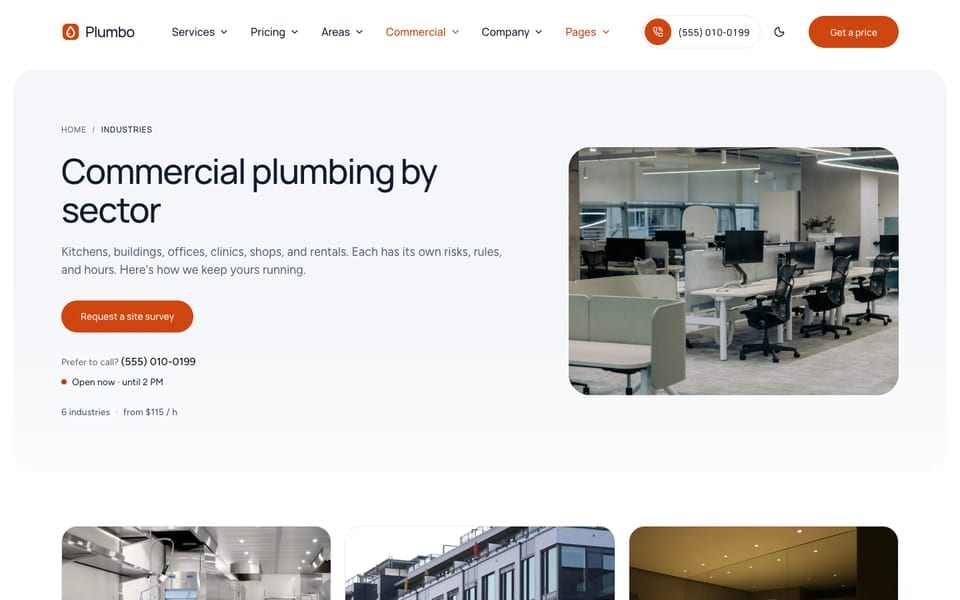
The industries collection holds Plumbo’s commercial sectors: one page per kind of building you serve. The samples are restaurants, offices, medical offices, retail, property managers, and short-term rentals. The header menu lists them under Commercial, and /home-commercial/ shows them as a sectors grid (industriesStrip with the grid layout). Fields: eyebrow (short name), code, weight (order), action (walkthrough: buttons go to the site survey form at #walkthrough; book: buttons go to /book/; default walkthrough), bookService, schedules, services (service ids), serviceNotes, price (service, label, unit, for example { service: "drain-cleaning", label: "$129", unit: "first drain" }), ticket, needsTitle, needs, scopeTitle, notCovered, faq. Only in -index.md: industryField (the name of the site survey form field that lists the sectors), contactSection (the “Request a site survey” form on every sector page), and detail (blocks shared by every sector page). When you add a sector, add its link to the Commercial menu in each src/config/menu.<language>.json.
Careers
One file per open role:
| Field | Type | What it does |
|---|---|---|
trade, area | ids | Group heading on /careers/ (a trade id from the services file); area id or "all" |
type | full-time | part-time | contract | internship | seasonal | Labels from careers.types in src/i18n/en.json |
pay | min, max, unit (hour or year) | Pay range, in the currency of [settings.estimator] currency |
schedule, start | text | Facts in the role ticket |
requirements | list of text | Yes/no checks in the role ticket |
applyUrl | URL | Send applicants to your hiring system or a mailto: instead of the form |
date, validThrough | date | Posting date and last day to apply |
code, weight | Role number; order inside its group | |
application | In -index.md: the apply form every role page shows. In a role: enable: false hides it there |
Dates, pay, and type feed the JobPosting data search engines read. Keep only real, open roles: replace or delete the samples before launch.
Team
One file per member, plus -index.md for /team/. Fields: title (the name, first name and last initial), profession (role), trade, area, since (year), languages, knownFor (up to 90 characters), image (optional 4:5 portrait), weight. Members have no page of their own, and no personal email, phone, or social links. The schema is strict: a misspelled field fails astro-check.
Blog And Authors
- Posts are
.mdxfiles insrc/content/blog/english/:title,description,image,imageAlt,date,updated,author,categories,tags,featured(the lead post on/blog/),service(a rate-card id: the price band at the end of the post), anddraft. - Authors live in
src/content/author/english/, one file per author:title(required, the name),role,image,description,links. A post’sauthor: "Tom B."matchestom-b.md. - Posts per page:
blogPaginationin[settings]ofconfig.toml.
See Writing Content for the shortcodes you can use in posts.
Do It With AI
Add a [service | service area | commercial sector | review | project | job opening | team member | blog post] tosrc/content/[folder]/english/ for: [DETAILS]. Copy the frontmatter keys of an existing entry inthat folder, keep its comments, and fill in my values only. Check the field types insrc/content.config.ts, and use ids that already exist for trade, service, and area. Then create theother language versions in src/content/[folder]/ with the same file name, and run npm run astro-check.