


Reviews & Projects
Files: src/content/reviews/english/, src/content/sections/english/trust-strip.md, src/content/projects/english/ · Skill level: Beginner
Two collections show proof of your work. Reviews are what customers wrote, one file per review. Projects are finished jobs with a before and an after photo, one file per job.
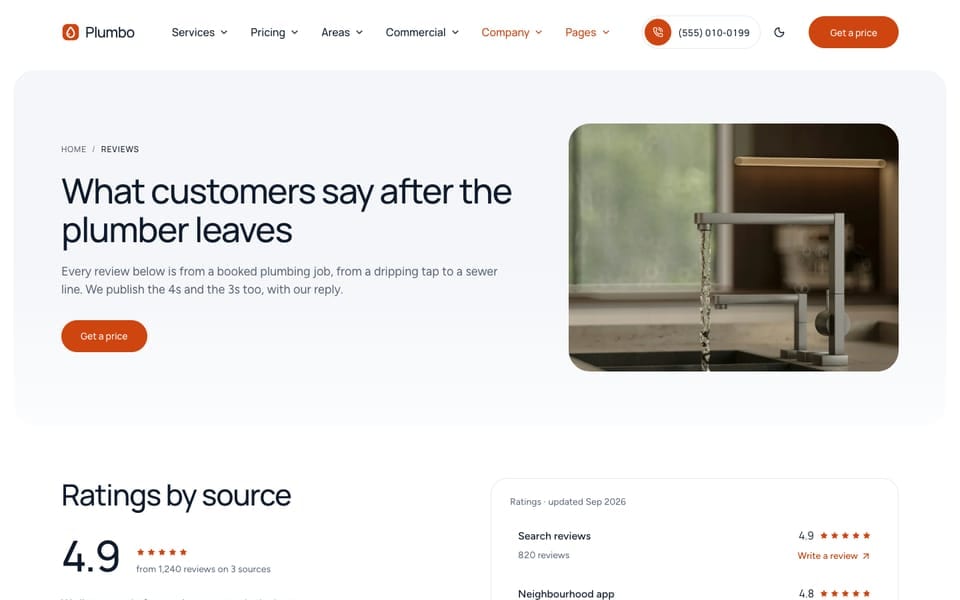
A Review
Each review is one file in src/content/reviews/english/. The file name is free; the samples use date-name-service.md:
---# Sample review: replace with a real one, with the customer's consent.name: "James W." # sample; first name and last initial only, no photoarea: "westfield-heights" # area id in src/content/areas/ (free text is shown as written)service: "sewer-line-repair" # service id in src/content/services/; drives the filter chipsrating: 5 # sample; whole number, 1 to 5source: "survey" # rating source id from sections/trust-strip.md ("via ..." line)date: 2026-10-28 # shown as month and yearfeatured: false # featured band on /reviews/, first pick on the homepagetext: "I manage four apartment buildings. They surveyed each main line with a camera, …" # up to 700 charactersdraft: false---| Field | What it does |
|---|---|
name | The reviewer’s first name and last initial. Reviews never show a photo |
area | An area id (the review then shows on that area’s page) or plain text |
service | A service id. Sets the filter chip on /reviews/ and shows the review on that service’s page |
rating | A whole number from 1 to 5 |
source | Where the review came from, as a source id from trust-strip.md (see below) |
date | The date of the review, shown as month and year |
text | The review, up to 700 characters. npm run astro-check reports a longer one |
featured | Puts the review in the featured band on /reviews/ and first on the homepages |
reply | Optional answer from you, shown under the review: reply: { text: "…", name: "Ana, office" } |
Every field is optional in the schema, so a new, empty file never breaks the build. A review shows only once name, service, rating, source, date, and text are all filled in.
Each language has its own review files. Copy each file to each other language folder, such as src/content/reviews/french/, with the same name, translate text (and reply), and keep the other fields the same.
Where Reviews Appear
| Place | Which reviews | Set in |
|---|---|---|
/reviews/ | Every review, with service chips, a featured band, and the ratings summary (wall layout) | src/content/pages/english/reviews.md |
| Homepages | The newest and featured reviews, filtered by service on three of the four homes (below) | reviewsSection in each homepage file |
| Service pages | Reviews with that service. With fewer than 2, reviews of the same trade fill in | reviewsSection in detail: of src/content/services/english/-index.md |
| Area pages | Reviews with that area | The area file |
The section has eight layouts (default, marquee, wall, summary, carousel, spotlight, single, band); see Section Layouts. Its options:
reviewsSection: summary: true # ratings ledger from sections/trust-strip.md filter: service: "" # service id; empty = every service services: [] # several service ids; used when `service` is empty area: "" # area id; empty = every area excludeFeatured: true # featured reviews render in the featured band only limit: 0 # 0 = every review options: layout: "wall"Reviews On Each Homepage
Each homepage picks its reviews with filter in its reviewsSection block, so a home about drains shows drain reviews:
| Home | Layout | filter.services | limit |
|---|---|---|---|
/ | single | drain-cleaning, sewer-line-repair | 3 |
/home-residential/ | summary | none: every review | 3 |
/home-water/ | marquee | water-heater-repair, tankless-water-heaters, water-filtration, leak-detection, pipe-repair | 12 |
/home-commercial/ | carousel | drain-cleaning, sewer-line-repair, emergency-plumbing | 4 |
When you add your own reviews, give each one the right service id, and check that every home still has enough reviews to fill its layout. If you rename or remove a service, update these lists in src/content/homepage/english/ and the other language folders. The single layout on / also takes portraits: one photo of the work per review, in review order. Use photos of the work, never faces.
The Rating Summary
The average rating, the review count, and the per-source ratings are typed, not counted from the review files. You copy them from the places where customers review you. They are in src/content/sections/english/trust-strip.md:
rating: enable: true value: 4.9 # sample average out of 5 count: 1240 # sample number of reviews label: "from {count} reviews" # {count} and {value} are replaced url: "/reviews/" sources: # Generic labels only; no third-party logos or names # id: matched by review entries' `source` (reviews page); url: optional "Write a review" link # updated: optional date the numbers were last copied - id: "search" label: "Search reviews" value: 4.9 # sample count: 820 # sample url: "https://example.com/review" updated: 2026-09-01valueandcountfeed the rating on thephotohero of/home-residential/, the trust strip, the reviews block on/home-residential/,/home-water/, and/home-commercial/(thesinglelayout on/shows none), and the summary on/reviews/.- Each source is one row of the ratings summary.
urladds a “Write a review” link;updatedis the date you last copied the numbers. - Keep the labels generic. The shipped file uses “Search reviews”, “Neighbourhood app”, and “After-job survey” instead of third-party names or logos.
- Update the numbers when they change. A rating that is out of date or higher than your real one misleads customers.
Why Reviews Have No Rich Results Markup
Plumbo adds no Review or AggregateRating structured data, on purpose. These are reviews you collect and publish on your own site about your own business. Google does not show review stars for those (“self-serving” reviews), and marking them up anyway goes against its review snippet guidelines. The reviews still help: visitors read them, and search engines read the text. Your star rating in search comes from your business profile and the review sites themselves.
If a review platform you use offers its own widget, follow its terms. Don’t copy its reviews into review markup.
Projects (Before And After)
Each project is one file in src/content/projects/english/ and one page at /projects/<file-name>/. From tankless-water-heater-swap.md:
title: "Tank to tankless water heater swap"description: "A leaking 15-year-old tank replaced with a wall-hung tankless unit, new venting, and a larger gas line."date: 2026-09-09 # job date: sorts the grid (newest first) and shows on the ticketticket: "4158" # job number, shown as #4158trade: "water-heaters" # trade id from `trades:` in src/content/services/english/-index.mdservice: "tankless-water-heaters" # service entry id: chip, service link, and /book/?service=area: "westfield-heights" # area entry id from src/content/areas/# industry: "" # optional industry id: lists this project on that industry pagefeatured: false # the large card on /projects/ and the homepage job (first `true` wins)before: "/images/projects/water-heater-install-before.jpg" # same crop and angle as `after`after: "/images/projects/water-heater-install.jpg"beforeAlt: "Utility room before: rusted water heater tank with a water stain on the floor"afterAlt: "The same room after: tankless unit on the wall with new venting and valves"caption: "Utility room, after the tankless unit and isolation valves went in" # under the large sliderduration: "5 h" # time on site, shown as writtencrewSize: 2 # number of plumbers on the jobscope: # check rows on the job ticket, in work order - "Old tank drained and taken away" - "Gas line upsized for the new burner"price: # optional; remove to hide the total row amount: 3400 # sample note: "Fixed price, unit and removal included"quote: # optional customer words about this job text: "Three teenagers and nobody runs out of hot water any more. …" name: "Marco D." # first name and last initial, no photo detail: "Westfield Heights"The Markdown body is the write-up (“The job”, “What we did”, “The result”). gallery adds more before/after pairs as static frames:
gallery: # optional extra pairs, shown as static split frames - before: "/images/projects/vent-before.jpg" after: "/images/projects/vent-after.jpg" beforeAlt: "Outside wall before: the old flue opening" afterAlt: "The same wall after: the new vent terminal" caption: "Venting through the outside wall"None of the shipped projects has a gallery; the paths above are examples.
price.amount is a plain number in your currency. It is typed, not computed from the pricing file.
Where projects appear: /projects/ (a grid with trade buttons and the featured project large, set in src/content/projects/english/-index.md), the “Similar jobs” block on each project page (relatedProjects in the same file), a recent job on service pages (matched by service), area pages (matched by area), industry pages (matched by industry), and the residential homepage /home-residential/ (the gallery layout). A page with no matching project hides the block.
The section’s layouts are default (one large slider beside the job ticket), grid (project cards), and gallery. Its defaults, including the frame shape, are in src/content/sections/english/before-after-section.md:
options: layout: "default" # default | grid | gallery (masonry of job photos, button) aspect: "3/2" # slider frame (default layout): 4/5 | square | 3/2 | 4/3 start: 50 # divider start, 0–100 % from the start edgeAlign A Before/After Pair
The slider stacks the after photo on the before photo and reveals it as the visitor drags the line (or uses the arrow keys). Both photos are cropped to the same frame (aspect), from the center. If the two photos differ, the line shows a jump instead of a change.
- Shoot both from the same spot. Same position, height, lens, and zoom. Mark the spot (a piece of tape on the floor) or take the before photo again from the same marks before you start work.
- Keep the same orientation. Both landscape or both portrait.
- Crop both the same way. Crop the pair to the same aspect ratio and the same size, ideally the ratio of the frame (3:2 by default, square on service and area pages). The build prints a
[BeforeAfter]warning when the two ratios differ by more than 5%. - Save them in
src/assets/images/projects/with matching names (kitchen-before.jpg,kitchen-after.jpg), and write the paths as/images/projects/kitchen-before.jpg. - Write both alt texts so the difference is clear without the image: “Before: …” and “The same … after: …”.
- Check the result at
/projects/<file-name>/. Drag the line across a fixed point (a tap, a tile edge). It should not move between the two photos.
A project with no after photo shows the before photo alone, without a slider, and the build prints a warning.
To add a project, copy a project file, rename it (the name is the URL), change the fields and photos, and copy it to each other language folder, such as src/content/projects/french/, with the same name. The service, area, trade, and industry values must be ids that exist, or the project won’t show on those pages.
Do It With AI
Replace the sample reviews with these real ones (I have each customer's consent): [NAME, AREA,SERVICE, RATING, SOURCE, DATE, TEXT; ...]. One file per review in src/content/reviews/english/,with the service and area ids that exist in my content. Delete the samples. Then set the ratingin src/content/sections/english/trust-strip.md to [AVERAGE] from [COUNT] reviews, with sources[LABEL: VALUE, COUNT, URL; ...]. Do the other language files too.Add a project: [TITLE], [SERVICE] in [AREA], [DATE], job number [N], [N] plumbers, [TIME] on site,scope [STEPS], price [AMOUNT or none]. My photos are [BEFORE FILE] and [AFTER FILE]. Copy themto src/assets/images/projects/, check they have the same aspect ratio and tell me if not, thencreate the project file from src/content/projects/english/tankless-water-heater-swap.md and its copies in the other language folders.