


Footer & CTA Band
Files: src/config/config.toml, src/i18n/<language>.json, src/config/menu.<language>.json, src/config/social.json, src/content/sections/english/call-to-action.md · Skill level: Beginner
In the Tina edition at /admin/, the columns are Footer in Menus and footer columns, the text is Footer in Interface labels, the layout and copyright are in Site settings > Settings, and the icons are in Social links. In the Sanity edition, the columns are Menus > Footer columns and the text is in Interface labels, under your language in the Studio. The layout, copyright, and social links are in Site settings.
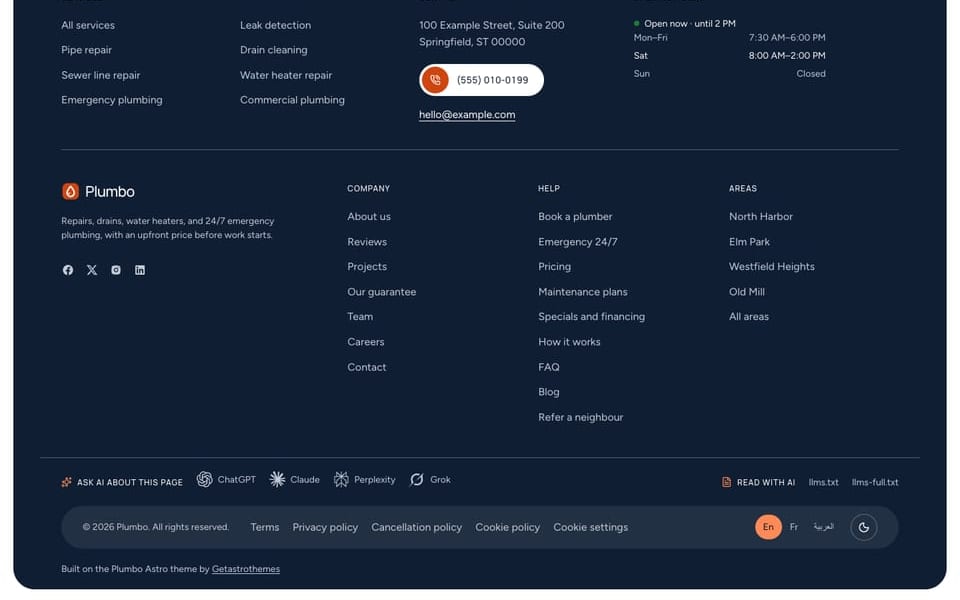
The footer closes every page with your links, contact details, opening hours, social links, the legal row, a row of Ask AI links, and the theme credit. Plumbo has four footer layouts. Above the footer, a page can also show a CTA band: a closing call to action with a button and your phone.
Choose A Footer Layout
[settings.layout] # default | minimal | large | columns footer = "default"| Layout | What it shows | Demo page |
|---|---|---|
default | A rounded navy panel. On top, a headline with the main button, and the newsletter signup. Then the Services column in two columns beside your address, phone, email, and opening hours with the “Open now” line. Under the logo and description, the other link columns and the social icons. The copyright, legal links, language switch, and light/dark button sit in the bottom row | /home-residential/, inner pages |
minimal | A navy block: logo and a one-line statement, the first two link columns and the social links, then a row with the copyright, the legal links, and the language switch. The shortest footer, with no newsletter | /home-commercial/, /book/ |
large | A cool grey panel with the newsletter in a tab cut into its top edge. A big claim with your phone and email and the main button, the link columns, and an orange-framed Specials and financing box that links to /specials/. Then your service areas beside the social icons, and the legal row | /home-water/ |
columns | A navy block: logo and description, up to three link columns and a contact column divided by thin lines, the main button with the language and light/dark switches, and the copyright centered under a line | / |
One page, another layout. Add footerLayout to the page’s frontmatter. It wins over the config:
---title: "Book a visit"footerLayout: "minimal" # default | minimal | large | columns---/book/ uses minimal this way, so the booking form stays the focus.
Footer Text
The headings and short texts are UI strings in src/i18n/<language>.json, under footer:
| Key | Shipped English text | Used by |
|---|---|---|
footer.description | “Repairs, drains, water heaters, and 24/7 emergency plumbing, with an upfront price before work starts.” | default (under the logo), minimal (the statement), columns, and large when footer.largeText is empty |
footer.ctaTitle | “Get an upfront price for your repair” | default: the headline above the main button. "" hides the headline and its button |
footer.largeTitle, footer.largeText | “Licensed plumbers, ready when you call”, “Leaks, clogs, and no hot water, fixed at the price we quote.” | large: the big claim and the line under it |
footer.giftTitle, footer.giftText, footer.giftLink | “Specials and financing”, “Current coupons, and monthly payments on bigger jobs.”, “See current specials” | large: the specials box, linking to /specials/ |
footer.hours, footer.contact, footer.areas, footer.socialsTitle | “Opening hours”, “Contact”, “Service areas”, “Socials” | Column headings |
footer.copyright | ”© {year} {brand}. All rights reserved.” | Every layout |
[settings] footerDescription in config.toml replaces footer.description in every language: use it only on a single-language site.
The address, phone, email, and hours come from [business] in config.toml. See Business Info.
Copyright
[settings.copyright] enable = true text = "" # `{year}` and `{brand}` are replaced with the build year and `site.title`Leave text empty to use footer.copyright from the i18n files. {year} becomes the year of the build, so the notice stays current, and {brand} becomes [site] title.
Footer Links
The link columns come from the footer list in src/config/menu.<language>.json. The last column (Legal) always goes in the bottom row, and a column with "source": "areas" lists your service areas. See Menus.
Ask AI Row
Every footer layout has a row of links that ask an AI assistant about the current page, and links to the page’s Markdown copy, llms.txt, and llms-full.txt. It ships on:
[settings.pageActions] enable = true footer = true # false removes this row providers = ["chatgpt", "claude", "perplexity", "grok"] # empty hides the "Ask" linksIts labels are ai.footerAsk, ai.footerRead, and ai.footerMarkdown in the i18n files. See AI Links & llms Files.
Theme Credit
Every footer layout ends with the theme credit, and it is also the last line of llms.txt. It is editable in config.toml. The part of text in [brackets] becomes the link to url:
[settings.themeCredit] enable = true text = "Built on the Plumbo Astro theme by [Getastrothemes]" url = "https://getastrothemes.com/astro-themes/plumbo/"Newsletter
The default and large footers show a Mailchimp signup form. It posts to [settings.subscription] formAction in config.toml, which ships as a placeholder: until you set it, npm run dev shows a warning inside the form. [settings.subscription] enable = false hides every signup form. The heading is subscription.title in the i18n files.
Social Links
The social icons in the default, minimal, and large footers come from src/config/social.json:
{ "main": [ { "enable": true, "label": "facebook", "icon": "/images/icons/facebook.svg", "url": "https://www.facebook.com" } ]}The shipped links point to the networks’ home pages. Replace each url with your own profile, and set enable to false on networks you don’t use. icon is an SVG in src/assets/images/icons/; label is the name screen readers hear.
The CTA Band Above The Footer
The CTA band is a closing section with a title, a line of text, the main button, and your phone with the “Open now” line. It is the section call-to-action.md, and it is off by default: the default footer already starts with a headline and button. Pages that want the band turn it on with a ctaSection block. On /home-residential/ and /home-water/ it is the emergency band, and on / the navy panel.
# src/content/sections/english/call-to-action.md (trimmed)enable: false # a page block with `enable: true` shows iteyebrow: ""title: "Leak, clog, or no hot water? Get it fixed today."description: "Call our 24/7 line for an emergency, or book online and see the upfront price first. It takes about a minute."button: enable: true label: "Book a plumber" url: "/book/" variant: "fill-white"phone: true # the phone and open-now line from [business]image: "/images/services/pipe-repair-at-work.jpg" # `default` layout: 4:3 photo; empty hides itimageAlt: "A plumber working on the drain pipes under a vanity"options: layout: "default" # default | split | band | newsletter | slanted | panelTurn it on for one page in its frontmatter. The block must include enable: true, because the section file ships with false:
ctaSection: enable: true title: "Burst pipe or no water? Call us now." options: layout: "band"Most inner pages ship with it on (about, areas, careers, FAQ, guarantee, projects, services, team, and others), and so do all four homepages: panel on /, band on /home-residential/ and /home-water/, and split on /home-commercial/. The contact page, the industries page, and the blog index keep it off.
| Layout | What it looks like |
|---|---|
default | With an image: a white section with the title, text, orange button, and phone beside a framed photo. With image: "": a full orange block with the same copy |
split | An orange block: copy on the start side, a recap ticket on the end side (“Drain cleaning · one fixture”, three check rows, and a price) with the buttons in its footer. Shows secondaryButton |
band | A full-width brand-orange band: label, title, text, a white call pill, a white outline button, and the photo to the page edge |
newsletter | Copy on the left, the newsletter signup on the right. Shows default instead when [settings.subscription] is off |
slanted | A navy block, the copy at the top and the photo under it with a slanted top edge |
panel | A navy rounded block inside the page width: the title centered with one line under it, the orange book pill, and a white call pill with your number (the main homepage) |
The split layout’s ticket reads ticket: in the section file. Its price is computed from your rate card (quote: with a rate-card id, the job size in home (hours or units), and a frequency), so it follows your pricing; remove quote and set total to type a price instead. See Pricing & Estimator.
The title is plain text in one color: Markdown emphasis such as *word* shows as plain text.
Files For Developers
src/layouts/components/global/Footer.astro picks the layout and draws default. The others are in src/layouts/components/global/footer/: FooterMinimal.astro, FooterLarge.astro, and FooterColumnsBlock.astro, with FooterColumns.astro (the link columns), FooterNap.astro (your contact details and hours), FooterLegal.astro (the bottom row), FooterAi.astro (the Ask AI row), FooterCredit.astro (the theme credit), FooterSocials.astro, and FooterLanguages.astro. The CTA band is src/layouts/components/sections/CallToAction.astro, with its layouts in sections/call-to-action/ (CtaLayout.astro, CtaSplit.astro, CtaSlanted.astro, CtaPanel.astro).
Do It With AI
Set the footer to the [default | minimal | large | columns] layout in [settings.layout] ofsrc/config/config.toml. Rewrite footer.description, footer.ctaTitle, footer.largeTitle, andfooter.largeText in each file in src/i18n/ for my business: [ONE LINE ABOUT US]. Put mysocial profiles in src/config/social.json: [URLS], and disable the networks I didn't list.Show the CTA band on [PAGE URL] with the [default | split | band | newsletter | slanted | panel] layout:add a ctaSection block with enable: true and options.layout to the page's content file inevery language folder. Title "[TITLE]", button "[LABEL]" to [URL]. Keep the other fields fromsrc/content/sections/english/call-to-action.md.