


Services & What’s Included
Files: src/content/services/english/ (one file per service, plus -index.md), src/content/pricing/english/-index.md · Skill level: Beginner
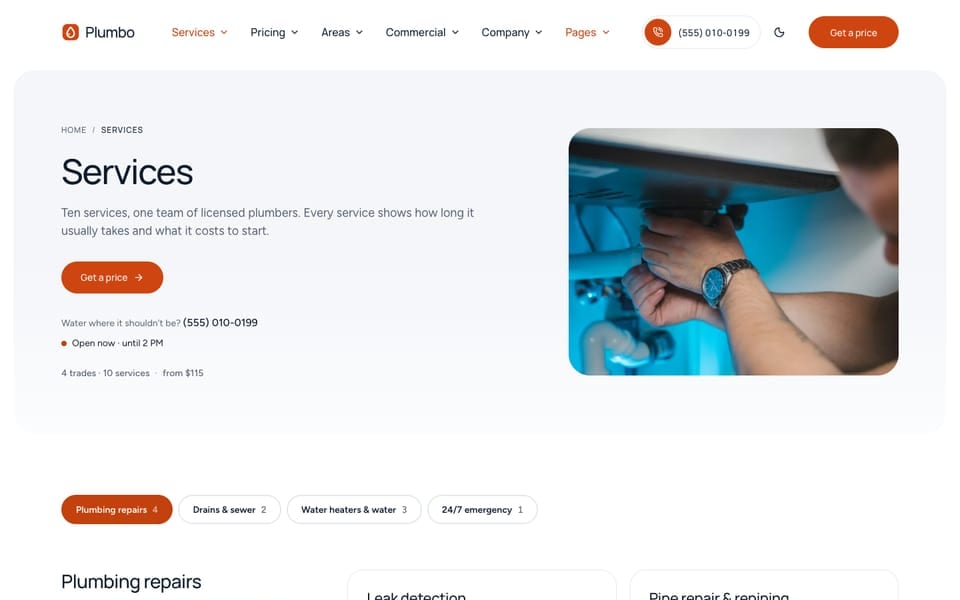
Each service is one file in src/content/services/english/ and one page at /services/<file-name>/. The theme ships ten plumbing services in four trades: plumbing repairs (leak detection, pipe repair and repiping, toilet, faucet and disposal repair, bathroom and kitchen plumbing), drains and sewer (drain cleaning, sewer line repair), water heaters and water (water heater repair and replacement, tankless water heaters, water filtration and softeners), and 24/7 emergency plumbing.
The service files feed the services page (/services/), each service page, the booking form, the “what’s included” checklists, and the structured data. The price of a service is not in its file: it comes from the rate card with the same id in the pricing file.
The Services Page
/services/ lists every published service grouped by trade, with a sticky row of trade links, then a comparison of drain cleaning and sewer line repair (“Clear the drain or fix the line?”), the add-ons, questions, and a call to action. The page and its blocks are set in src/content/services/english/-index.md:
servicesSection: options: layout: "list" # default (bento) | list (grouped rows) jumpNav: true # list: sticky trade links with counts groupByTrade: true # list: false gives one flat listEach row shows the service title, description, duration, crew, highlight, and its “from” price. pageHeader.summary: true adds the line “4 trades · 10 services” and the lowest “from” price, counted from your files.
Trades
Trades are defined once, under trades: in src/content/services/english/-index.md. Each trade is one group on /services/. The columns of the header’s Services mega menu are written by hand in the menu files: see Menus.
trades: - id: "plumbing" label: "Plumbing repairs" description: "Leaks, pipes, and fixtures, billed by the half hour." # one-line promise icon: "Wrench" # Lucide name image: "/images/services/pipe-repair-at-work.jpg" # square crop beside the group on /services/ order: 1- The four trade ids are
plumbing,drains,water-heaters, andemergency. - A service joins a trade with
trade: "drains"and sets its place in it withorder. - Change a trade’s
orderto move it on/services/. - A trade with no published service is hidden.
- Keep trade ids identical in every language. The pricing file’s rate cards use them too (
trade:).
A Service File
From src/content/services/english/drain-cleaning.md:
title: "Drain cleaning"description: "Slow and blocked drains cleared with a cable machine or hydro-jetting, flow tested, and filmed when the blockage keeps coming back."serviceType: "Drain cleaning" # schema.org serviceType; empty uses the trade labeltrade: "drains" # trade id from `trades:` in -index.mdorder: 1 # position inside the tradeimage: "/images/services/drain-cleaning.jpg" # 4:5 photo, no people; service hero and social cardheroImage: "/images/services/drain-cleaning-at-work.jpg" # hero photo; empty uses `image`heroImageAlt: "A plumber clearing the trap under a kitchen sink"duration: "1–2 h" # mono meta on the services index rowscrew: "One plumber"highlight: "30-day no-clog warranty" # one short fact on the services index rowprice: "" # optional text instead of the rate-card "from" price, for example "Quote on visit"code: "DC-01" # short code on the service ticketrelated: ["sewer-line-repair", "fixture-repair", "emergency-plumbing"]options: layout: "estimate" # default | estimate | repair | commercial| Field | What it does |
|---|---|
title, description | Name and one-line summary, in lists and the page header |
trade, order | The trade group and the position inside it |
image, heroImage, heroImageAlt | The card and social image, and the photo at the top of the service page |
duration, crew, highlight | Short facts on the list row and in the service hero, written as you want them shown (crew: “One plumber”) |
price | Text that replaces the computed “from” price, such as “Quote on visit” |
code | A short code on the service ticket (“No. DC-01”) |
eyebrow, icon, serviceType | Small label above the title; Lucide icon on service cards (services photos and business layouts); the serviceType in structured data (empty uses the trade label) |
faq | 3 to 6 questions shown on this service page. Empty hides the questions section |
related | 3 service ids for “Often booked with”. Empty uses the next services of the same trade |
included, extras, notIncluded | The checklist (see “What’s Included” below) |
options.layout | The page template (see below) |
The URL comes from the file name: drain-cleaning.md is /services/drain-cleaning/. Each other language has a file with the same name, such as src/content/services/french/.
Service Page Templates
options.layout in a service file picks one of four page templates. Each sets the hero and the order of the sections:
| Template | Hero | Then | Used by |
|---|---|---|---|
default | Facts and a static service ticket | Checklist, add-ons, an estimate section with the price breakdown, steps, reviews, a recent job, questions, related services | Fixture installs, sewer line repair, water heaters, tankless, water filtration, fixture repair |
estimate | The estimator, locked to this service | Checklist, add-ons, steps, a recent job, reviews, questions, related services | Drain cleaning |
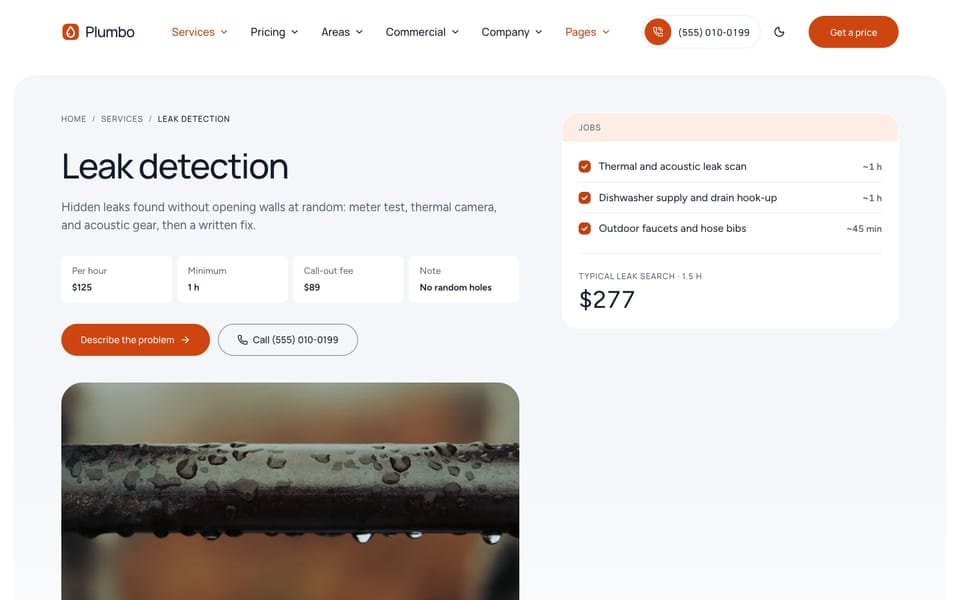
repair | Hourly rate block and the job list | “Jobs we take on”, a “Not our job” band, steps, reviews, questions, related services. No add-ons and no estimator | Leak detection, pipe repair, emergency plumbing |
commercial | Site ticket and a site survey button | Scope checklist, industry links, steps, a rating summary, questions, and the site survey form. No booking button | None of the samples; use it for a contract service for buildings |
A section with no data hides itself: no rate card, no estimate; no extras, no add-ons; no faq, no questions; no project for this service, no recent job.
Section copy shared by all service pages is in src/content/services/english/-index.md:
detail:holds the blocks every service page uses (includedSection,addOnsSection,estimateSection,reviewsSection,questionsSection,ctaSection, and more).{service}in a text becomes the service title:title: "Price your {service}".templates:holds blocks for one template only (estimate,repair,commercial), applied afterdetail:. Thecommercialblocks also swap the header button for “Request a site survey” with aprimaryCtablock.- A block in a service file wins over both, for that page only.
The service hero labels (the fact row, buttons, and the call line) are in src/content/sections/english/service-hero-section.md. Each template has its own hero component in src/layouts/components/sections/service-hero/: HeroFacts.astro (default), HeroEstimate.astro, HeroRepair.astro, and HeroCommercial.astro.
What’s Included
The checklists (“Every step on the job sheet” on a service page, “Clear the drain or fix the line?” on /services/, “Tank or tankless” on /pricing/ and /home-water/, “What each service covers” on /how-it-works/) all read one task list and three fields in each service file.
1. The task list. rooms: at the end of src/content/services/english/-index.md lists every task, grouped by area of the home or by job type. The shipped groups are emergency, whole-home, kitchen, bathrooms, laundry-utility, water-heater, water-quality, drains-sewer, and outdoor-yard:
rooms: - id: "drains-sewer" label: "Drains & sewer" tasks: - { id: "cable-clear", label: "Blockage cleared with a cable machine" } - { id: "camera-inspection", label: "Camera inspection, video sent to you" } # matched by the `camera-inspection` add-on's `task` - { id: "septic", label: "Septic tank pumping", note: "Needs a septic service." } - id: "whole-home" label: "Whole home" tasks: - { id: "shut-off-valve", label: "Shut-off valve replaced", note: "~45 min" } - { id: "mold", label: "Mould remediation", note: "Needs a remediation specialist." }note is a short detail under the task. On repair pages it is the usual time per job. For a task a service never covers, it is the reason. A task id can appear in several groups (check-shutoffs).
2. The service’s ticks. Each service file says what it does with those tasks:
From drain-cleaning.md:
# What gets done, by area or job typeincluded:  drains-sewer: ["cable-clear", "flow-test"]  kitchen: ["kitchen-drain"]  bathrooms: ["bath-drain"]  laundry-utility: ["laundry-drain"]  whole-home: ["work-photos"]
# Priced extras: add-on ids from `addOns` in src/content/pricing/english/-index.mdextras: ["camera-inspection", "hydro-jetting", "drain-screens", "cleanout-install", "after-hours"]
# Never done on this service: task ids, listed with the dictionary `note` as the reasonnotIncluded: ["spot-repair", "trenchless", "septic"]
Each task then shows one of three marks:
| Mark | When |
|---|---|
| Tick (included) | The task id is listed under that group in included |
| Plus and a price | An add-on in extras points at the task with its task field in the pricing file. The price comes from the add-on |
| Dash | Anything else. Tasks in notIncluded are listed under “Never covered” with their note |
So an extra appears in the checklist only when both are true: the service lists the add-on in extras, and the add-on has task: "<task id>" in the pricing file. Change the add-on price in the pricing file and the checklist updates.
A task row appears only when at least one compared service includes or offers it. Unknown group, task, or add-on ids are skipped, and the build prints an [included] warning naming them.
The Comparison Section
includedSection sets which services a checklist compares:
From src/content/services/english/-index.md:
includedSection: title: "Clear the drain or fix the line?" services: ["drain-cleaning", "sewer-line-repair"] featured: "drain-cleaning" rooms: ["drains-sewer"] # room ids shown first options: layout: "default" # default (columns by service) | rooms (tabs by room)services: 1 to 4 service ids. One service shows a single checklist card; 2 to 4 show a comparison with one column per service.featured: the outlined column, shown first on phones.rooms: the groups to show first; empty shows every group.showAllRooms: true(defaultfalseinincluded-section.md) keeps the others behind a “Show all areas” button.showPrices(defaulttrueinsrc/content/sections/english/included-section.md): the “from” price under each column name and the add-on prices.- Layouts:
default(columns by service) orrooms(one tab per group). Theestimatetemplate usesrooms.
Prices On Service Pages
A service page prices itself from the rate card whose id equals the service file name (drain-cleaning):
- The “from” price in the hero and on
/services/, the booking tile, and the estimator all come from that card. See Pricing & The Estimator for the formula. - The add-ons section (“Add to this visit”) lists the pricing-file add-ons whose
servicesinclude this service, with their prices. It shows ondefaultandestimatepages when the service file has at least one id inextras. Keepextrasand the add-ons’serviceslists in step. - No rate card with that id: the page shows “Price on request”, no estimator, and the service is not offered on
/book/. Useprice: "Quote on visit"to write your own text.
Add A Service
- Copy a service file close to the new one, for example
fixture-repair.md, and rename it (gas-line-repair.md). The file name is the URL and the id. - Change
title,description,trade,order, the photos, the facts,faq,related, and the checklist fields. Pickoptions.layout. - Add new tasks to
rooms:insrc/content/services/english/-index.mdif the checklist needs them. - Add a rate card with
id: "gas-line-repair"tosrc/content/pricing/english/-index.md. Without one the service shows “Price on request”. - Do the same in each other language: the service file with the same name, such as
src/content/services/french/, the tasks in its-index.md, and the rate card (same numbers) in its pricing file. - Add its link to the header’s Services menu, and to the footer’s Services column if you want it there, in each
src/config/menu.<language>.json./services/and/book/pick the service up on their own.
To hide a service, set draft: true in every language file. To remove it, delete those files, its rate card in every pricing file, and every reference to its id: related in other services, services lists in includedSection and estimateSection blocks, reviews (service:), projects (service:), areas (services:), and the menus. Run npm run astro-check and npm run build, and read the warnings.
Do It With AI
Add a service "[NAME]" in the [TRADE] trade, priced [per hour | per unit: UNIT] at[RATES], call-out fee [X]. Copy src/content/services/english/[SIMILAR].md to a new file named[slug].md, use the [default | estimate | repair] template, and fill in the description, facts,3 questions, and the checklist: included [TASKS], never covered [TASKS]. Add the rate card withthe same id to src/content/pricing/english/-index.md. Do the other language files with the same filenames and numbers, then run npm run astro-check.Update what my drain cleaning includes: [LIST BY AREA OF THE HOME]. Add-ons offered: [NAME: PRICE]. Nevercovered: [TASKS, with a one-line reason]. Use the task ids in rooms: insrc/content/services/english/-index.md (add new tasks there if needed), and set task: on eachadd-on in the pricing file so it shows in the checklist. Do the other language files too.