


The Job Ticket
Files: the ticket: blocks in your content files, src/sections.schema.ts (sharedTicket) · Skill level: Beginner
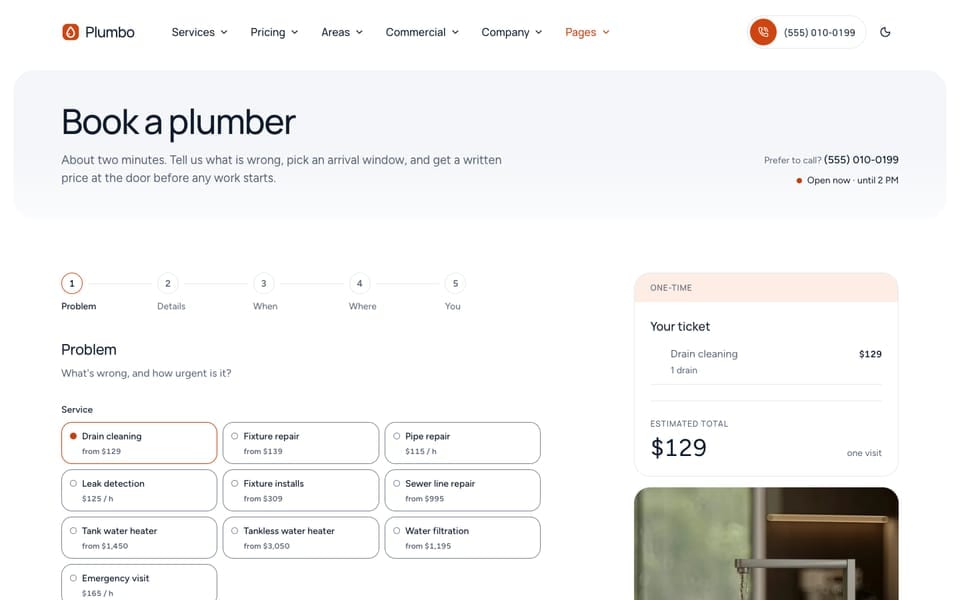
The job ticket is the receipt-style card Plumbo uses for prices, checklists, and short facts: a mono number in the header, rows with small marks, and a total at the bottom. Some tickets are filled in by the theme (the estimator, the booking summary); others you write in a ticket: block in a content file.
Where Tickets Appear
Computed by the theme. You don’t type their rows or totals; they come from the pricing file and the service, area, or project files:
| Ticket | Where | What sets it |
|---|---|---|
| The estimator | /pricing/, estimate and default service pages | The rate cards. number in estimateSection replaces the computed code |
| “Your ticket” beside the booking form | /book/ | The rate cards. summaryTitle in booking-section.md |
| The service ticket in the hero | Service pages | The service file and its rate card. Hourly and per-unit services show 3 task rows |
| The “Not covered” ticket | Repair service pages | notIncluded in the service file; ticketLabel and footnote in not-covered-section.md |
| The area ticket | Area pages | The area file (ZIP codes, crews, phone, hours) and the first rate card it offers |
| The job ticket of a project | Project pages, recent-job blocks | The project file (ticket, crewSize, duration, scope, price) |
The estimate code in the header (for example EST-4K7Q2) is built from the visitor’s selection, so the booking form shows the same code the visitor saw in the estimator, and you receive it with the request. Change the EST prefix with ticketPrefix in [settings.estimator] (src/config/config.toml).
Written by you in a ticket: block:
| Ticket | File |
|---|---|
Page header, split layout | pageHeader.ticket in a page file, for example src/content/guarantee/english/-index.md, src/content/careers/english/-index.md, src/content/pages/english/specials.md (the featured coupon) |
Call to action, split layout | ticket in src/content/sections/english/call-to-action.md, and the “Free site survey” card in ctaSection of src/content/homepage/english/home-commercial.md |
| Steps beside a ticket | stepsSection.ticket in src/content/pages/english/how-it-works.md and src/content/about-us/english/-index.md |
| 404 page | ticket in src/content/sections/english/not-found-section.md |
| Booking thank-you page | ticket in src/content/pages/english/book-thanks.md |
| Policy summary | contentPage.summary in src/content/pages/english/cancellation-policy.md and terms-conditions.md (add one to any page that has a contentPage block) |
| Industry site ticket | ticket: (a list of rows) in src/content/industries/english/<industry>.md |
| In a blog post | The <JobTicket> component (see below) |
Ticket Fields
Every written ticket uses the same fields (sharedTicket in src/sections.schema.ts):
ticket: number: "2041" # "2041" → "No. 2041" label: "Drain call" # header right: date or service title: "Kitchen drain cleared" meta: # optional label/value pairs under the title - { label: "Plumbers", value: "1" } rows: - { type: "check", label: "Flow test before we leave" } - { type: "line", label: "Late cancellation", value: 40 } total: label: "To pay" value: 0 # a number is money; a string is shown as written ("On quote") unit: "per visit" footnote: "Sample values. Set your own."| Field | What it does |
|---|---|
number | The mono number in the header. Digits show as “No. 2041”. In page headers, a number with letters shows as written (“GUARANTEE”) |
label | Short text on the right of the header |
title | The ticket heading |
meta | Optional label/value pairs under the title |
rows | The rows (see the row types below) |
total | The bottom line: label, value, and an optional unit. A number counts up and is formatted as money |
footnote | A small line at the bottom |
Row Types
Each row has a label (inline Markdown is allowed), an optional detail (a second, muted line), an optional value, and a type:
type | Shows | Value |
|---|---|---|
check | A ticked row: included. The default when type is left out | Optional |
extra | A plus row: an add-on | A number shows as ”+$149” |
excluded | A dashed row: not covered | Empty shows “not covered” |
line | A plain label and value | Text or a number |
discount | A discount line | A number shows as a negative amount |
note | A plain note | Optional |
Money or text. A number value is money: it is formatted per language with the currency in [settings.estimator] (40 shows “$40” in English and “40 $US” in French). A string is shown exactly as written ("up to 24 h before", "$0"). Use a string when the value is not an amount, or to control the exact text.
key is a stable id that some tickets use to fill a row in. For example, on the careers page a row with key: "pay-range" and an empty value shows the pay range of your open roles, and on the 404 page the row with key: "requested" shows the address the visitor asked for.
A Computed Total In The Call To Action
The call to action’s split layout can price its ticket from the rate cards instead of a typed total:
ticket: title: "Two blocked drains" rows: - { type: "check", label: "Flow test on every drain" } # The total is computed from the rate card, as in the estimator. Remove `quote` and set # `total: { label, value, unit }` to type it instead. quote: service: "drain-cleaning" # rate-card id from src/content/pricing/ home: { units: 2 } # the size: `hours` for an hourly card, `units` for a units card frequency: "" # frequency id from the pricing file; empty = the card's defaultWith the sample rates, two drains are 79 + 2 × 50 = $179. Set quote.service: "" to show no computed total, as the commercial homepage does with its typed “Free” total.
Prefer quote wherever you show a price: it follows your rates. A typed total does not.
In A Blog Post
In an .mdx post or page, <JobTicket> turns a Markdown list into a ticket. Each list item becomes a check row:
<JobTicket title="Before the plumber arrives" code="TIP-021" label="Drain call" service="drain-cleaning">
- Clear the cabinet under the sink- Find the main shut-off valve
</JobTicket>codeis the ticket number andlabelthe header text.service(a rate-card id) adds that service’s “from” price as the total and a “Get a price” button to/book/?service=….totalreplaces the price with your own text (“From $129”).footnoteadds a small line.
Leave a blank line after the opening tag and before the closing tag, or the list is not read. More examples are on the /components/ page (src/content/pages/english/components.mdx).
/elements/ shows a ticket in every size and color on one page, with a working demo.
Do It With AI
Update the ticket in the page header of src/content/guarantee/english/-index.md: number"[TEXT]", label "[TEXT]", rows [ROWS], total "[TEXT]". Use the row types check, line, andexcluded from sharedTicket in src/sections.schema.ts. Write money as a number unless it needsspecial text. Do the other language files too.Find every `ticket:` block and `contentPage.summary` in src/content (every language) thatshows a fee or price as typed text or a number, list them with their file, and update them tomatch my prices: [FEES AND PRICES].