


Pricing & The Estimator
Files: src/content/pricing/<language>/-index.md, src/config/config.toml ([settings.estimator]) · Skill level: Beginner
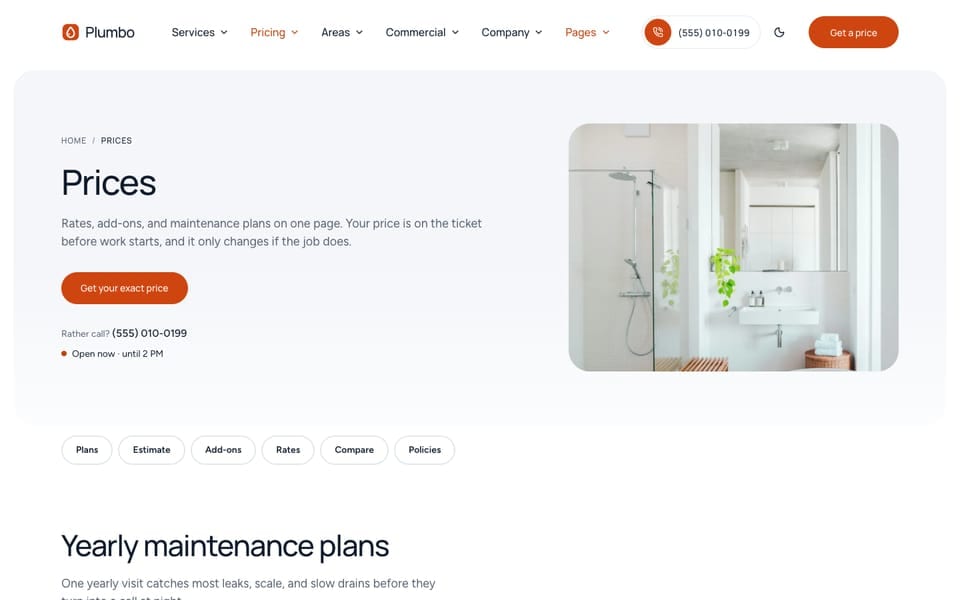
Every computed price in Plumbo comes from one file per language: src/content/pricing/english/-index.md (and a copy for each other language). The estimator, the rate sheet, the add-ons, the booking form total, the “from” prices on service and area pages, the plan prices on the main homepage /, and the prices in structured data all read it. Change a rate there and every page that shows it updates on the next build.
The yearly maintenance plans on /pricing/ are the exception: they are a yearly fee, written as text (see “Maintenance Plans” below).
What Is In The Pricing File
The top of the file is the pricing page (title, page header, jump links). Under the line PRICE DATA come four blocks:
| Block | What it holds |
|---|---|
rounding | The step that discounted prices round to (5 rounds to the nearest 5) |
frequencies | The visit options and their discounts. Plumbo ships one: once (one visit) |
rateCards | One card per bookable service: how it is priced, its limits, and its notes |
addOns | Extras with a fixed price, such as “Camera inspection” or “Hydro-jetting” |
The page sections come after the data. /pricing/ shows them in this order: the maintenance plans (plansSection), the estimator (estimateSection), the add-ons (addOnsSection), the rate sheet (ratesSection), a tank-or-tankless comparison (includedSection), the payment and warranty questions (questionsSection), and the closing call to action (ctaSection).
One Visit At A Time
Plumbing work is booked one job at a time, so the shipped file has a single frequency, and every rate card has recurring: false:
rounding: 5 # Discounted service prices round to the nearest 5. Use 1 to keep exact amounts
frequencies: # Discount applies to the service line only, never to add-ons  - id: "once" # keep the id `once` for the one-visit option ("one visit" instead of "per visit")    label: "One visit"    discount: 0    default: true # preselected everywhere
With no recurring card, the estimator and the booking form hide the “How often” choice. Keep the id once. To offer a discount to plan members, see “Add A Member Discount” below.
Rate Cards
Each rate card is one service you can price online. Its id must match the file name of the service page in src/content/services/english/ (drain-cleaning for drain-cleaning.md). That link gives the service page its “from” price and its estimator. A service without a rate card shows “Price on request”.
Plumbo prices plumbing work in two modes:
mode | The visitor sets | Price of the service line |
|---|---|---|
hourly | Hours | callOutFee + the larger of (hours, hours.min) × hourlyRate |
units | A count: drains, fixtures, feet of pipe, tank gallons | base + units × perUnit |
The code also has a third mode, rooms (priced by bedrooms and bathrooms), which no shipped card uses.
An hourly card and a units card, from the shipped file:
rateCards: - id: "pipe-repair" label: "Pipe repair" trade: "plumbing" # trade id from src/content/services/{lang}/-index.md `trades:` mode: "hourly" # rooms | hourly | units hourlyRate: 115 # sample callOutFee: 89 # sample; added once per visit, credited to the repair when you go ahead hours: { min: 1, max: 8, step: 0.5, default: 2 } recurring: false note: "Call-out fee credited to the repair. Parts at cost with receipts." largerNote: "Repiping the whole home? Call {phone} for a fixed quote." - id: "drain-cleaning" label: "Drain cleaning" trade: "drains" mode: "units" unit: { one: "drain", other: "drains" } # plural forms for this language base: 79 # sample; call-out and setup, so the first drain is $129 perUnit: 50 # sample units: { min: 1, max: 6, step: 1, default: 1 } recurring: false duration: { base: 1, perUnit: 0.5 } # hours, sample note: "Cable clearing and a flow test on every drain. 30-day no-clog warranty." largerNote: "More than 6 drains, or the main line backing up? Call {phone}."The ten shipped cards: drain cleaning (per drain), fixture repair and fixture installs (per fixture), pipe repair, leak detection, and the emergency visit (hourly), sewer line repair (per foot), tank water heater (per gallon of tank size), tankless water heater (per unit), and water filtration (per system).
| Key | What it does |
|---|---|
id | The service id. Same as the service file name, and the value in /book/?service= |
label | The service name on tickets, chips, and the booking form |
trade | The trade it belongs to (plumbing, drains, water-heaters, emergency). Groups the rate sheet and the add-ons |
mode | hourly or units (see above) |
hourlyRate, callOutFee | Prices for hourly cards. callOutFee is added once per visit |
base, perUnit, unit | Prices for units cards, and the unit name in singular (one) and plural (other) |
hours, units | The limits of each number field: min, max, step (optional), and the starting value default |
minimum | Optional. The smallest total for one visit, add-ons included. No shipped card sets one |
recurring | true lets frequency discounts apply and shows the “How often” choice. false (or left out) prices one visit |
frequencies | The frequency ids this card offers. Empty means all of them |
duration | Optional time on site: base, plus perUnit on units cards. Shown as “About 1.5 h” |
note | A short line on the ticket, such as “Parts at cost with receipts.” |
largerNote | Shown when the visitor reaches the largest size. {phone} becomes your business phone |
When a card leaves out a limit, the theme uses these fallbacks: hours 1 to 8 in steps of 0.5 (start 2), units 1 to 100 (start 1).
Add-ons
addOns: - { id: "camera-inspection", label: "Camera inspection", description: "The line filmed end to end; the video is yours.", price: 149, services: ["drain-cleaning", "leak-detection"], task: "camera-inspection" } # sample - { id: "expansion-tank", label: "Thermal expansion tank", description: "Required by code on many closed systems.", price: 245, services: ["water-heater-repair"], task: "expansion-tank" } # sample| Key | What it does |
|---|---|
price | A flat price. Discounts never apply to add-ons |
services | The rate-card ids it can be added to. Empty means every service |
task | Optional task id from the “what’s included” list. The checklist then shows the add-on price on that task (see Services & What’s Included) |
description | Optional short detail, shown in the add-ons section |
How The Estimate Is Calculated
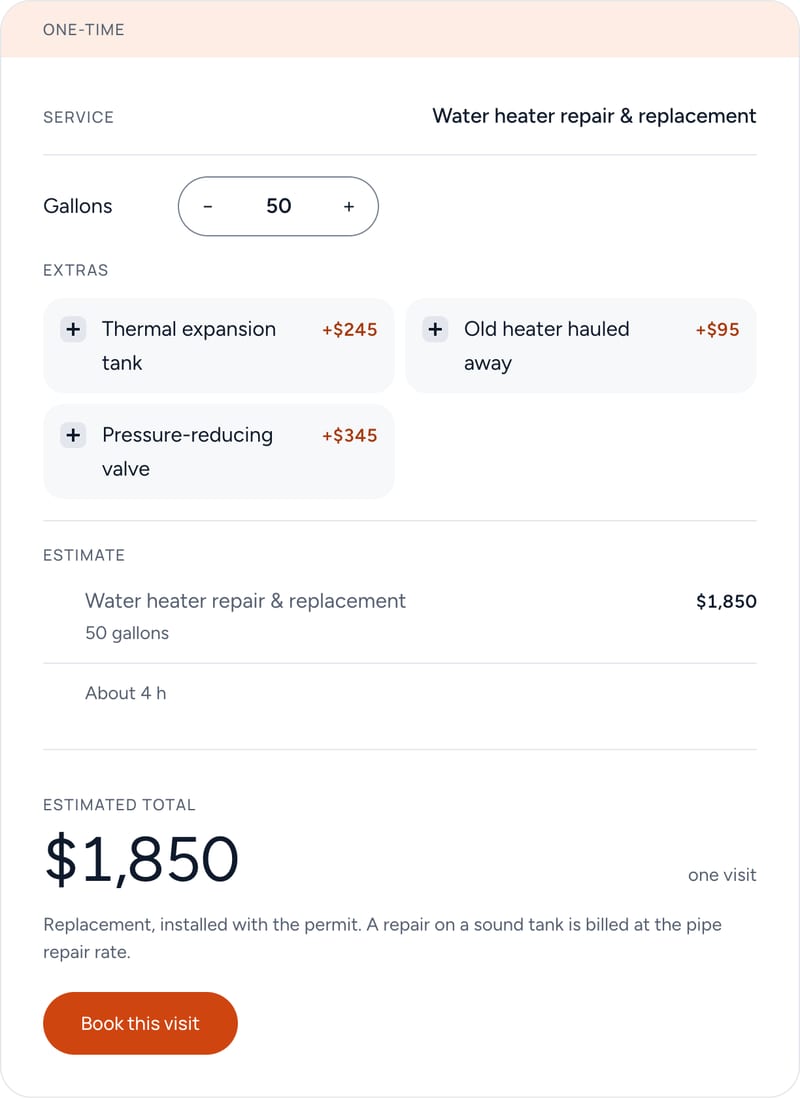
The formula is in src/lib/pricing.ts. The estimator, the booking summary, the plan prices, and the “from” prices all call it, so two pages never show different prices for the same job.
- Service line. Work out the line for the card’s mode (the table under Rate Cards). A number outside the card’s limits is moved to the nearest allowed value. The result is rounded to a whole amount.
- Discount. Only on a
recurringcard: if the visitor picked a frequency with a discount, take the percent off the service line, then round to the nearestrounding(5 by default). The difference shows as its own discount line. - Add-ons. Add the price of each selected add-on. Add-ons are never discounted.
- Minimum. If the card has a
minimumand the total so far is below it, the total is raised to the minimum and the ticket shows a “Minimum” line with the difference. - Time on site. If the card has a
duration, it is worked out the same way and rounded to the nearest half hour. Hourly cards show the hours chosen.
Worked examples with the shipped sample rates:
- Drain cleaning, 1 drain: 79 + 1 × 50 = $129, about 1.5 h on site.
- Drain cleaning, 2 drains, with a camera inspection: 79 + 2 × 50 = $179, + $149 = $328.
- Pipe repair, 2 hours: 89 + 2 × 115 = $319.
- Tank water heater, 50 gallons: 850 + 50 × 20 = $1,850.
“From” prices (services list, booking tiles, area pages, structured data) use the smallest allowed size, one visit, and no add-ons. Drain cleaning starts at 79 + 1 × 50 = $129, so it shows “from $129”. Hourly cards show the hourly rate (“$115 / h” for pipe repair).
Check any change by hand with these steps, then open /pricing/ and compare the ticket.
Where Prices Appear
| Place | What it shows | Where you set it |
|---|---|---|
/pricing/ | Maintenance plans, the estimator with its price breakdown, add-ons, the rate sheet, and the tank-or-tankless comparison | The page blocks in the pricing file |
estimate service pages | The estimator in the hero, locked to that service (drain cleaning in the samples) | options.layout: "estimate" in the service file |
Service pages on the default layout | An estimate section locked to that service, with the breakdown | estimateSection in the detail: block of src/content/services/english/-index.md |
/services/ | The “from” price on each row, and the lowest price in the page header | Computed from the rate cards |
/book/ | The “from” price on each service tile and the live total | Computed from the rate cards |
/ (main homepage) | Two plan cards side by side (duo layout), priced from the drain cleaning and emergency rate cards | plansSection in src/content/homepage/english/-index.md |
| Area pages | The “from” price on the area ticket | The first rate card the area offers |
The estimator and rate-sheet blocks in the pricing file:
estimateSection: # defaults: estimate-section.md  title: "Price your job"  services: ["drain-cleaning", "fixture-repair", "pipe-repair", "water-heater-repair", "bathroom-kitchen-plumbing"] # rate-card ids in the picker  service: "drain-cleaning" # preselected  ledger: true # price breakdown under the intro (collapsed under the ticket on phones)
ratesSection: # a second plans section, rendered with the `hourly` layout (trade rate sheet) title: "Every rate card" note: "All rates include travel inside our service areas." # small mono line under the intro trades: [] # empty = every trade with an hourly or per-unit rate card options: layout: "hourly" # default | hourly | tableestimateSection.serviceslists the services in the estimator’s picker, in order. Empty offers all of them. Up to 5 show as chips, 6 or more as a list.ledger: trueshows the “How this price is built” breakdown next to the estimator.- The defaults of every section are in
src/content/sections/english/(estimate-section.md,plans-section.md,add-ons-section.md).
Maintenance Plans
/pricing/ opens with three yearly maintenance plans: Essential, Plus, and Complete. A plan here is a yearly fee, not a rate card, so its price is the text in customPrice:
plansSection: # defaults: plans-section.md title: "Yearly maintenance plans" showDiscounts: false # no recurring discounts: every rate card is one visit at a time plans: # lists replace the plans-section.md list - name: "Plus" customPrice: "$249 / year" # sample; a plan is a yearly fee, not a rate card featured: true badge: "Chosen most" # sample description: "For family homes with two or more bathrooms." features: ["Everything in Essential", "One drain cleared each year", "15% off repairs", "Priority booking, same day when we can"] button: { enable: true, label: "Ask about Plus", url: "/contact/", variant: "fill" } addOns: { enable: false } # the full add-ons section follows options: layout: "default" # default | hourly | tablecustomPriceis shown exactly as written. Change the fee and the ”/ year” text there. It does not change when you edit a rate card.- The plan buttons go to
/contact/. Plumbo takes no payments, so a customer asks for a plan and you sign them up yourself. - The features are plain text. If a plan promises money off (“15% off repairs”), the estimator does not take it off unless you add a member discount (next section).
- The same three plans are the defaults in
src/content/sections/english/plans-section.md.
A plan can also be priced from a rate card: rateCard: "<rate-card id>" with a size in home ({ hours: 1 } for an hourly card, { units: 1 } for a units card). The price is then computed, as on the main homepage /:
plansSection: priceLabel: "From" # `duo`: small label over each price plans: # `duo` shows the first two - name: "Standard drain service" rateCard: "drain-cleaning" home: { units: 1 } # one drain - name: "Emergency drain service" rateCard: "emergency-plumbing" home: { hours: 1 } # first hour, call-out included options: layout: "duo"A size outside the card’s limits is moved inside them, and the build prints a [plans] warning. A rate-card plan’s button opens the booking form with the plan’s service and size already chosen.
Plan layouts: default (plan cards), hourly (trade rate sheet, used by ratesSection), table, savings (the recurring discounts as tiles), and duo (the first two plans side by side in one panel). See Section Layouts. The /specials/ page uses the same section for its coupons, each with a customPrice such as “$50 off”.
Add A Member Discount
To take a percentage off the estimate for maintenance plan members, add a second frequency and let the cards it applies to use it. The comment above frequencies in the pricing file describes the same change.
-
In
src/content/pricing/english/-index.md, add a frequency afteronce. Keepdefault: trueononce, so visitors see the normal price first:frequencies:- id: "once"label: "One visit"discount: 0default: true- id: "member"label: "Plan member"discount: 15 # percent off the service line, never off add-ons -
On each rate card the discount applies to, set
recurring: trueand list both ids:- id: "pipe-repair"# ...recurring: truefrequencies: ["once", "member"]Cards you leave at
recurring: falsestay one visit only, with no choice shown. -
Make the same change in
src/content/pricing/french/-index.mdandsrc/content/pricing/arabic/-index.md: the sameid, the samediscount, and the same cards. Translate onlylabel. If a number differs,npm run buildprints a[pricing]warning naming it. -
Check the wording. The option’s text is the
labelin the pricing file, so no new key is needed insrc/i18n/. The heading over the choice is the existing “How often” text (estimator.frequencyandbooking.frequencyin eachsrc/i18n/<language>.json). You can change it there, for example to “Membership”, in every language. -
Match the plan text: if the plans say “15% off repairs”, use
discount: 15. -
Run
npm run devand open/pricing/and/book/?service=pipe-repair. The estimator and step 1 of the booking form now show the “How often” choice with “One visit” and “Plan member” and its discount. With the sample rates, 2 hours of pipe repair cost $319, or $270 for a member (15% off, rounded to the nearest 5).
The visitor picks the option, and the request you receive says frequency: member. Plumbo has no customer accounts, so check that the customer is a member when you confirm the visit.
Currency And Number Formats
The currency is set once, for every language, in src/config/config.toml:
[settings.estimator] enable = true currency = "USD" # ISO 4217 code, one currency for every language currencyDisplay = "symbol" # symbol ($ / $US) | narrowSymbol ($ in every language) | code (USD) bookUrl = "/book/" # "Book this visit" and the no-JS form go here, with the selection in the query string ticketPrefix = "EST" # Mono code on the ticket, e.g. EST-4K7Q2 animateTotal = true # Count between totals; always off with reduced motionEach language formats the same amount its own way:
currency / currencyDisplay | English | French |
|---|---|---|
USD / symbol | $1,850 | 1 850 $US |
USD / narrowSymbol | $1,850 | 1 850 $ |
EUR / symbol | €1,850 | 1 850 € |
GBP / symbol | £1,850 | 1 850 £GB |
USD / code | USD 1,850 | 1 850 USD |
Whole amounts show without decimals; other amounts show two. Write the numbers in the pricing file as plain numbers (115, 0.5), never with a currency sign.
enable = false hides the estimator everywhere. animateTotal = false stops the total from counting up between values.
Keep Every Language Identical
Each language has its own pricing file, so the labels can be translated. The numbers must match. The build compares every number in each language’s file with the default language’s, and prints a warning that names each difference:
[pricing] Numbers in src/content/pricing/french/-index.md differ from src/content/pricing/english/-index.md: rateCards.pipe-repair.hourlyRateFix that language’s file until the warning is gone. Translate label, note, largerNote, description, and unit; keep every id the same in every file.
The pricing collection has a schema, so npm run astro-check reports a missing mode or a price written as text. If the file has an error, the build stops with a schema error that names the file and the field.
Prices Typed As Text
Many places show a price as written, not computed. They do not change when you edit a rate, so check them after a price change:
- The maintenance plan fees (
customPricein the pricing file and insrc/content/sections/english/plans-section.md) and the coupons on/specials/(src/content/pages/english/specials.md). - The step previews in
src/content/sections/english/steps-section.mdand in therepairtemplate ofsrc/content/services/english/-index.md(for examplevalue: "$319"). - Sector prices (
price.label, such as"$129", insrc/content/industries/english/). - Fees and amounts in questions and policies:
questionsSectionin the pricing file (the deposit and financing thresholds),src/content/pages/english/cancellation-policy.md,terms-conditions.md,src/content/faq/english/-index.md, andsrc/content/guarantee/english/-index.md. - Project prices (
price.amountinsrc/content/projects/), referral rewards (src/content/pages/english/referral.md), and the insurance value insrc/content/sections/english/trust-strip.md.
Search your content for the currency sign to find the rest.
The estimate ticket itself (the card with the mono code and the total) is documented in The Job Ticket.
Do It With AI
Set my prices in src/content/pricing/english/-index.md. Currency: [ISO CODE] in[settings.estimator] in src/config/config.toml. Call-out fee [X]. Pipe repair [X] per hour, leakdetection [X] per hour, emergency visit [X] per hour with a [X] call-out. Drain cleaning: base [X],[X] per drain. Tank water heater: base [X], [X] per gallon. Add-ons: [NAME: PRICE; ...]. Keep everyid and key, remove the `# sample` comment from each value you replace, and copy the same numbers tothe pricing file of every other language. Then work out two drains with a camera inspection withthe formula in src/lib/pricing.ts and show me the total.Add a [X]% member discount for my maintenance plan members on [RATE-CARD IDS]: a frequency withid "member" in src/content/pricing/english/-index.md, and recurring: true withfrequencies: ["once", "member"] on those rate cards. Keep "once" as the default. Do the same inevery other language's pricing file with the same numbers, and update the plan features thatmention a repair discount.Search my src/content folder (every language) for prices typed as text, such as plan fees,coupons, step previews, sector prices, fees in questions and policies, and project prices. Listeach one with its file, and update them to match my pricing file.