


Service Areas
Files: src/content/areas/english/ (one file per area, plus -index.md), and a folder for each other language · Skill level: Beginner
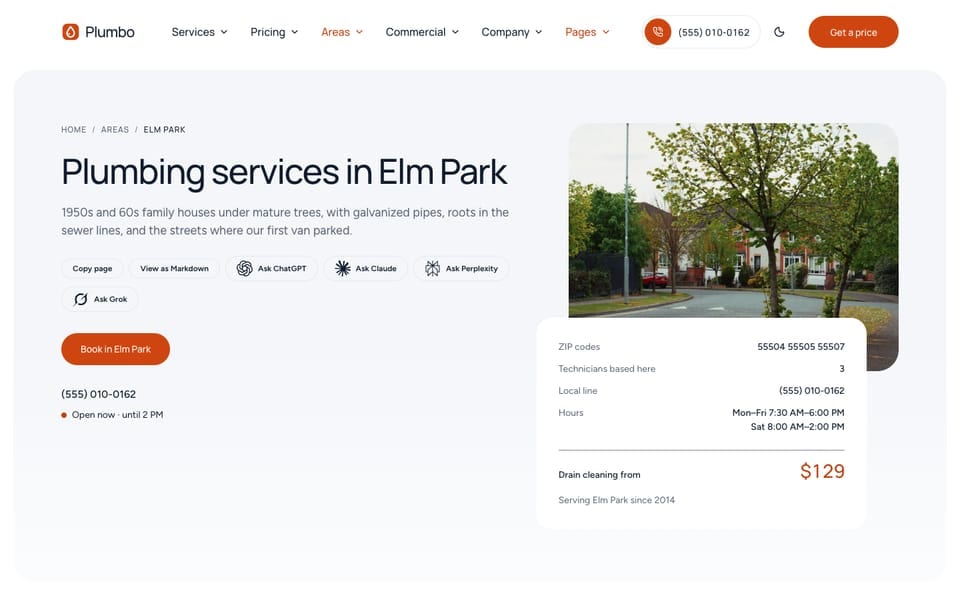
A service area is a town, district, or group of postal codes your plumbers cover. Each area is one file in src/content/areas/english/ and one page at /areas/<file-name>/. From those files Plumbo builds:
- the areas page
/areas/, with an area finder (type a ZIP code or a town), - one page per area, with its local phone, hours, neighbourhoods, prices, reviews, and a recent job,
- the Areas column in the footer,
- the ZIP check on the booking form,
areaServedin the structured data.
The four shipped areas (North Harbor, Elm Park, Westfield Heights, Old Mill) are fictional, with sample ZIP codes. Replace them with your real areas before you launch.
An Area File
From src/content/areas/english/elm-park.md:
title: "Elm Park" # area name: lists, menus, breadcrumbs, schema `name`heading: "" # optional H1; empty uses "Plumbing services in {area}" (i18n `areas.heading`)description: "1950s and 60s family houses under mature trees, with galvanized pipes, roots in the sewer lines, and the streets where our first van parked." # lists + meta description (≤ 155 characters)metaTitle: "Plumbing and sewer services in Elm Park"region: "East side" # sub-line in area listscode: "02" # ticket number ("AREA Nº 02"); empty uses `order`order: 2 # position everywhere (lowest first)image: "/images/areas/elm-park.jpg" # 16:9 street or houses, no people. Optionalmap: "" # optional static map image of YOUR real area; the samples are fictional
zips: ["55504", "55505", "55507"] # sample; the area finder and the booking ZIP check match theseneighborhoods: # sample; the finder matches them too (case and accents ignored)  - "Elm Park Village"  - "Linden Row"aliases: ["Elmpark"] # other spellings or nearby towns the finder matches
# Local contact. Each field falls back to [business] in config.toml.phone: "+15550100162" # sample (555-01xx fiction range), E.164 for tel links and schemaphoneDisplay: "(555) 010-0162" # samplehours: {} # same per-day format as [business.hours]. Empty uses the business hoursoffice: {} # ONLY a real, staffed location (street, locality, region, postalCode). Never invent onecrews: 3 # sample: service vans based in this areasince: 2014 # sample: first year served
services: ["leak-detection", "pipe-repair", "drain-cleaning", "sewer-line-repair"] # shortened; empty = every serviceserviceNotes:  - service: "sewer-line-repair"    note: "Camera inspection before any root work"
introTitle: "Working in Elm Park"notes: # 3–4 local facts; `label` is a short mono tag  - label: "Pipes"    title: "Galvanized supply lines"    text: "Most houses here were built between 1950 and 1965 with galvanized steel pipes."faq:  - question: "Do you work in the Fernwood side streets?"    answer: "Yes, every street in 55507, including the private lanes off Cedar Commons."nearby: ["north-harbor", "old-mill"] # area ids for "Also nearby"draft: false---
Elm Park is where the company started: one van, a toolbox, and the houses around SchoolhouseGreen. …| Field | What it does |
|---|---|
title | The area name everywhere: the footer column, lists, breadcrumbs, structured data |
heading | The page title. Empty gives “Plumbing services in Elm Park” |
description | The line under the title and the meta description. Keep it under 155 characters |
region, code, order | Sub-line in lists, the number on the area ticket, and the position (lowest first) |
image, map | A 16:9 photo of the area, and an optional static map of your real area |
zips | The postal codes this area covers. The finder and the booking form match them exactly |
neighborhoods, aliases | Place names the finder also matches. They are listed on the page under “Neighbourhoods we cover” |
phone, phoneDisplay, hours | A local phone line and hours. Each empty field uses [business] in src/config/config.toml |
office | Only for a real, staffed office in this area. It adds the address to the page and the structured data |
crews, since | Facts on the area ticket (“Technicians based here”, “Serving Elm Park since 2014”) |
services, serviceNotes | The services offered here (empty means all) and a short note per service |
introTitle, the Markdown body | The intro section (“Working in Elm Park”) |
notes | 3 or 4 local facts, each with a short label |
faq | Questions for this area |
nearby | Area ids shown under “Also nearby” |
On an area page, the header phone, the phone bar on mobile, and the area ticket use the area’s own phone when it is set. The ticket’s price line is the “from” price of the first rate card in the pricing file that the area offers: for Elm Park, drain cleaning. See Pricing & The Estimator.
The page also shows the services offered there, reviews whose area is this area, and the newest project whose area is this area (hidden when there is none). To change those sections on one area, add a named block to its file, for example reviewsSection: { limit: 5 }.
The Areas Page
/areas/ is set by src/content/areas/english/-index.md. Its page header counts your areas, neighbourhoods, and ZIP codes (summary: true), and the area list comes from the area files:
areasSection: # defaults: areas-section.md finder: true # ZIP code or town lookup above the rows options: layout: "list" # default (finder + area grid) | list (finder strip + one directory row per area)The same section can appear on other pages with five layouts: default (area pills and the finder beside a photo), list (one row per area), finder (intro beside the finder panel), tabs (one tab per area with hours, address, phone, and email), and chips (pin chips, a help card, and a photo). The homepage / uses chips. Its defaults are in src/content/sections/english/areas-section.md; areas: [] shows every area, or list ids to show some.
The Area Finder
The finder is the box where a visitor types a ZIP code or a place name. It matches:
- An exact ZIP code from
zips: it goes straight to that area. - The start of a ZIP code (3 digits or more): it suggests the areas with matching ZIP codes.
- A name: the area
title, itsneighborhoods, and itsaliases. Case, accents, hyphens, and apostrophes are ignored, so “saint eloi” finds “Saint-Éloi”. Names that start with the text come first.
It shows up to 6 suggestions. Every area is built into the page, so with more than 150 areas the build prints an [areaFinder] warning; use the list layout then.
Menus And Footer
The footer column with "source": "areas" lists your published areas by itself, before its own “All areas” link.
The header’s Areas menu is a plain list, so you edit it by hand in each src/config/menu.<language>.json. When you add or remove an area, change its link and update the count in the last label:
{ "enable": true, "name": "Areas", "weight": 3, "hasChildren": true, "children": [ { "enable": true, "name": "North Harbor", "url": "/areas/north-harbor/", "weight": 1 }, { "enable": true, "name": "Elm Park", "url": "/areas/elm-park/", "weight": 2 }, { "enable": true, "name": "All areas (4)", "url": "/areas/", "weight": 5 } ]}See Menus.
Areas In Structured Data
Plumbo writes areaServed from your published area files only. It never invents a place.
- Every page: the business lists each area as an
AdministrativeAreawith its name and page URL. - Service pages: the service lists the areas that offer it (areas whose
servicesis empty or includes it). - Area pages: a service named after your business and the area (“Your Company in Elm Park”) with the area’s
regionand postal codes, and the services offered there. With a realoffice, the page instead describes a branch of the business with that address, phone, and hours.
With no area files, areaServed is left out. See SEO & AI Visibility.
Add An Area
- Copy an area file in
src/content/areas/english/, for exampleelm-park.md, and rename it. The file name is the URL:riverside.mdis/areas/riverside/. - Change
title,description,region,code,order, and the photo. - Set
zipsto the real postal codes, written exactly as people type them. Addneighborhoodsandaliases. - Set or clear the local
phone,hours,crews, andsince. Keepoffice: {}unless you have a real office there. - Write the
notes,faq, and the Markdown body about the area. Setnearbyto the ids of neighbouring areas. - Copy the file to each other language folder, such as
src/content/areas/french/, with the same file name and translate the text. Keepzips, ids, and numbers the same. - Add its link to the Areas menu in each
src/config/menu.<language>.json, and update the count in All areas. - Run
npm run dev, open/areas/, and type one of the new ZIP codes in the finder.
The footer column, the finder, the booking ZIP check, and the structured data pick up the new area on their own.
Remove An Area
Delete the file in every language folder, or set draft: true in each to hide it. Then search your content for its id and update:
- the Areas menu in each
src/config/menu.<language>.json, nearbyin the other area files,area:in reviews (src/content/reviews/) and projects (src/content/projects/). A review whose area id no longer exists shows the id as plain text.
Also check the copy that names your areas: the metaDescription and the questions in src/content/areas/english/-index.md, and the description in src/content/sections/english/areas-section.md (“Four areas, each with its own stocked vans”).
Do It With AI
Replace the sample service areas with mine: [AREA NAME: ZIP CODES, NEIGHBOURHOODS, LOCAL PHONEOR "use the main number"; ...]. Use src/content/areas/english/elm-park.md as the model, one fileper area named after the area, in order [ORDER]. Keep office: {} empty. Delete the sample areasI don't use, and fix every `nearby`, review `area:`, and project `area:` that pointed at them.Do the other language files with the same file names. Update the Areas menu and its "All areas"count in each src/config/menu.<language>.json, then the area counts in the copy ofsrc/content/areas/english/-index.md and src/content/sections/english/areas-section.md.