


Homepages
Files: src/pages/[...lang]/index.astro, home-residential.astro, home-water.astro, home-commercial.astro, src/content/homepage/english/ · Skill level: Beginner to edit, light code to reorder
Plumbo has four homepages, one per kind of plumbing business. They use the same sections with different content, layouts, header, and footer, so each one also shows which combination suits that business. Keep one as your homepage and delete the others, or keep a second one as a landing page.
| Homepage | URL | Route file | Content file |
|---|---|---|---|
| Drains and sewer (main) | / | src/pages/[...lang]/index.astro | src/content/homepage/english/-index.md |
| Residential plumbing | /home-residential/ | src/pages/[...lang]/home-residential.astro | src/content/homepage/english/home-residential.md |
| Water heaters and water quality | /home-water/ | src/pages/[...lang]/home-water.astro | src/content/homepage/english/home-water.md |
| Commercial plumbing | /home-commercial/ | src/pages/[...lang]/home-commercial.astro | src/content/homepage/english/home-commercial.md |
Each content file has a copy in each other language folder, such as src/content/homepage/french/. The Homepages group of the Pages menu links to all four. The three extra homepages ship with robots: "noindex, follow" and excludeFromSitemap: true, so search engines don’t index them.
Drains And Sewer (Main Homepage)
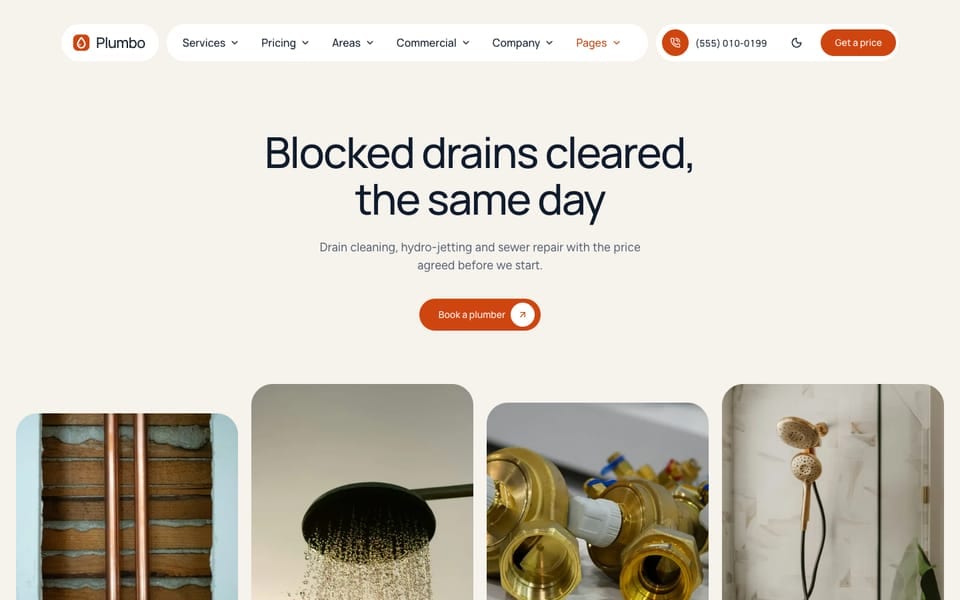
For a drain and sewer company. The whole page is warm stone, header and footer included, with a centred headline and a row of rounded photos.
Sections, top to bottom, with the layout set in -index.md:
- Hero,
strip: centred title, one button, photo row (heroSection) - Client logos,
plain(clientsSection) - Services,
chips: photo cards with a tag chip and a price chip (servicesSection) - Why choose us,
statement: a large centred statement and three figure cards (metricsSection) - How it works,
cards(stepsSection) - One large review,
single(reviewsSection) - Two ways to book,
duo: the first two plans side by side (plansSection) - CTA,
panel: a navy rounded block with book and call buttons, above the footer (ctaSection)
Header simple, shown as three floating pills on this page (page-drains in src/styles/v5/home-drains.css), footer columns.
Residential Plumbing

For a plumber who serves homes: leaks, drains, water heaters, and fixtures. A full-bleed photo hero under a floating header, with an orange numbers band over its lower edge.
Sections, top to bottom, with the layout set in home-residential.md:
- Hero,
photo(heroSection) - Numbers,
band: the orange block over the hero’s edge (metricsSection) - Services,
photos: 3×2 photo cards (servicesSection) - Why us,
bento(whyUsSection) - How it works,
photos(stepsSection) - Emergency band,
band(ctaSection, shown here in the page instead of above the footer) - Recent jobs,
gallery, photos from the projects collection (beforeAfterSection) - Reviews,
summary(reviewsSection) - Service areas,
chips(areasSection) - About us,
checks, with the years badge (featureGridSection) - Get a quote form,
quote(contactSection, anchor#quote) - FAQ,
default, with a call card (questionsSection)
Header centered (a white rounded bar floating over the hero photo), footer default.
Water Heaters And Water Quality
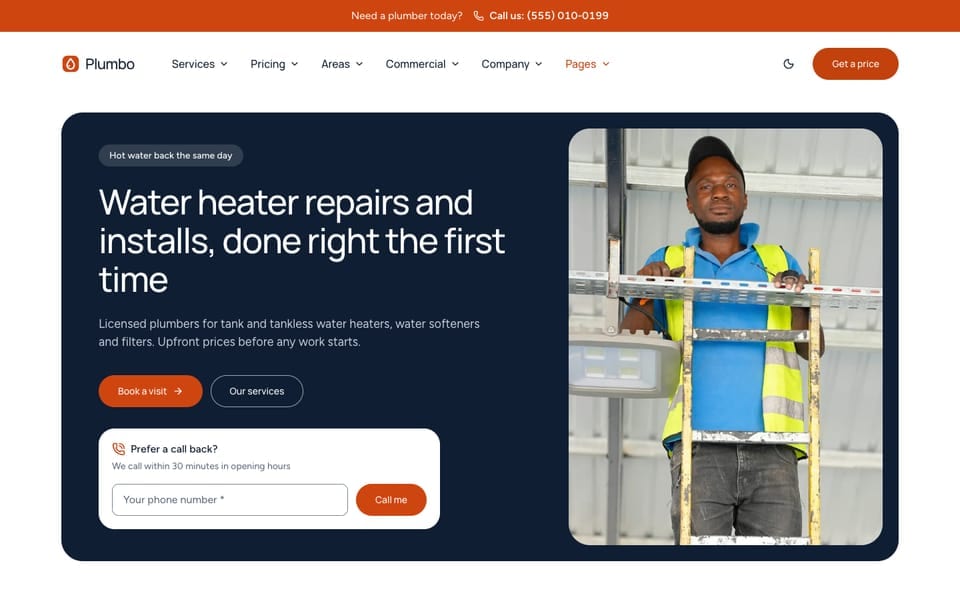
For a plumber focused on tank and tankless water heaters, softeners, and filters. A navy brand hero with one framed photo and a call-back card.
- Hero,
brand(heroSection) - Mission split with a moving strip,
mission(featureGridSection) - Numbers,
default(metricsSection) - Services,
tiles, on the navy block (servicesSection) - Why us,
rows(whyUsSection) - Tank or tankless: what each install covers (
includedSection, anchor#compare) - Reviews,
marquee(reviewsSection) - Team,
row, photo cards with a “since” chip (teamGridSection) - FAQ,
default(questionsSection) - Emergency band,
band(ctaSection)
Header utility (a call strip over a white bar), footer large.
Commercial Plumbing
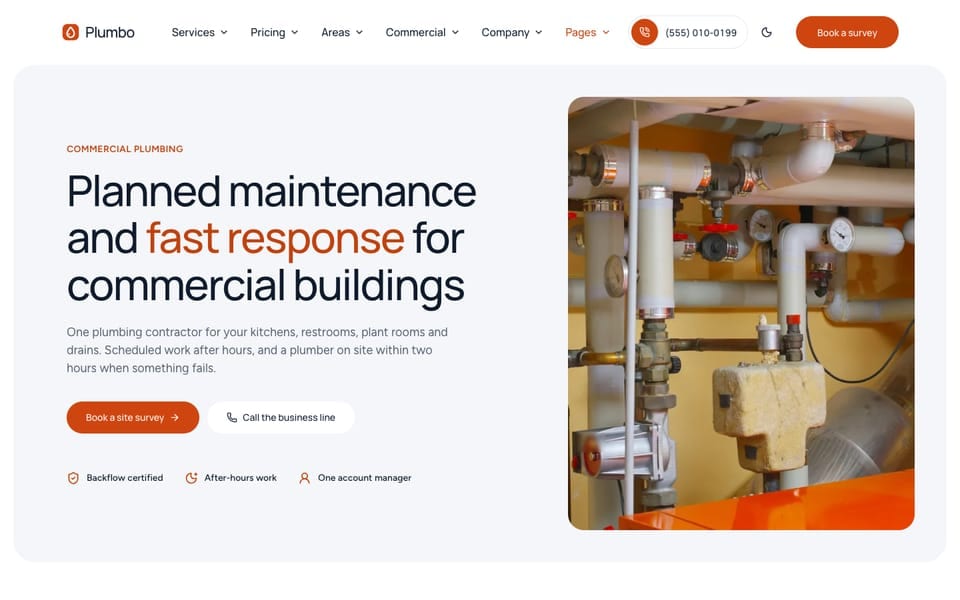
For a plumber who looks after restaurants, offices, clinics, shops, and rentals. There is no instant booking: every button leads to the site survey form near the end of the page (#survey) or to the phone.
- Hero,
panel: grey panel, framed photo, proof row (heroSection) - Commercial sectors,
grid, photo cards from the industries collection (industriesStrip) - Services,
business(servicesSection) - Permits and certificates, on a grey panel (
complianceSection) - Maintenance contract,
contract, on the navy block (featureGridSection) - How a job runs,
row(stepsSection) - Reviews,
carousel(reviewsSection) - Team,
portraits(teamGridSection) - Site survey form,
walkthrough(contactSection, anchor#survey) - FAQ,
card(questionsSection) - CTA,
split, above the footer (ctaSection)
Header default, footer minimal. Its primaryCta block turns the header button, the mobile action bar, and the footer’s booking link into “Book a survey” on this page:
primaryCta: # header button, phone bar, and footer booking link on this page (src/lib/primaryCta.ts) label: "Book a survey" url: "#survey" # the form near the end of this page announcement: "hide" # link (swap the bar's booking link) | hide | keepReviews On Each Homepage
Every homepage has its own reviewsSection block, and its filter decides which reviews from src/content/reviews/ it shows. Each review file names its service, so a homepage can show only the reviews that match its trade:
reviewsSection: filter: service: "" # one service id; empty = every service services: ["drain-cleaning", "sewer-line-repair"] # used when `service` is empty limit: 3| Homepage | Reviews shown |
|---|---|
/ | drain-cleaning, sewer-line-repair |
/home-residential/ | Every review (no filter), 3 in the summary layout |
/home-water/ | water-heater-repair, tankless-water-heaters, water-filtration, leak-detection, pipe-repair |
/home-commercial/ | drain-cleaning, sewer-line-repair, emergency-plumbing |
filter also takes area (an area id) to show only reviews from one service area. When you add your own reviews, set their service to one of your service ids so they land on the right homepage. See Reviews & Projects.
How A Homepage Gets Its Content
Each homepage content file holds one named block per section (heroSection:, servicesSection:, …). A block overrides the section’s default file in src/content/sections/english/ for this page only, and picks the section’s look with options.layout:
heroSection: # defaults: hero-section.md title: "Blocked drains cleared, the same day" options: layout: "strip" # default | split | form | band | photo | strip (centred title, one pill, photo row)- Objects merge key by key, so a block only needs the fields it changes.
- A list replaces the whole list: repeat every item you want to keep.
enable: falsehides that section on this homepage.
To change the text of the main homepage, edit -index.md, not the section files. Change every language. The allowed layouts are in the comment next to each layout:. More in Sections and Section Layouts.
Reorder Or Remove Sections
The order of the sections is set in the route file, not the content file.
The main homepage lists its sections in order near the top of index.astro:
const sections: HomeSection[] = [ { block: "heroSection" }, { block: "clientsSection" }, { block: "servicesSection" }, { block: "metricsSection" }, { block: "stepsSection" }, { block: "reviewsSection" }, { block: "plansSection" },];Each entry names a block of the content file. Reorder the entries to reorder the page, and delete an entry to remove that section, or set enable: false in its block instead, which is easier to undo. Add tone: "sage" to put a section on a panel (the allowed tones are listed in HomeSection in src/layouts/components/HomePage.astro); without tone the section has no panel. A block that is listed here but missing from the content file uses the section file’s defaults. The ctaSection block is not in the list: it is the CTA panel above the footer.
/home-residential/, /home-water/, and /home-commercial/ list their sections in the page, top to bottom. From home-residential.astro:
<Base {...homepageContent?.data} className="framed home-rhythm home-plumbo" footerSpaceTop={false} hideCallToAction layoutSwitcher> <LayoutVariants section="hero" content={heroSection} /> <MetricsSection content={metricsSection} /> <LayoutVariants section="services" content={servicesSection} /> <WhyUsSection content={whyUsSection} /> <LayoutVariants section="steps" content={stepsSection} /> <LayoutVariants section="cta" content={ctaSection} /> <BeforeAfterSection content={beforeAfterSection} /> <LayoutVariants section="reviews" content={reviewsSection} /> <AreasSection content={areasSection} /> <FeatureGridSection content={featureGridSection} /> <ContactSection content={contactSection} /> <LayoutVariants section="faq" content={questionsSection} /></Base>Move a line up or down to move the section. Delete a line to remove it, or set enable: false in its block instead. hideCallToAction stops the page from repeating the CTA above the footer, because this page shows ctaSection in its own place.
In the other homepages, a section wrapped in <SectionBand tone="..."> sits on a panel: sage, mist, or sand for the light grey panel, mint or blush for the peach tint, cream for warm stone, deep and coral for the orange block, and forest for the navy block. /home-water/ puts its services on forest, for example.
Keep the <LayoutVariants section="..." content={...} /> wrapper on the sections that use it (hero, services, steps, plans, reviews, FAQ, CTA). It renders the layout you set in options.layout. Replacing it with the section component itself still works, but leaves the section out of the layout switcher.
Use Another Homepage As Your Homepage
-
Copy the route. Replace the contents of
src/pages/[...lang]/index.astrowith the contents of the homepage you want, for examplehome-water.astro. In the copied code, change the entry name from"home-water"to"-index":const entry = await getEntryCTM("homepage", "-index", Astro.currentLocale); -
Copy the content. Replace the frontmatter of
src/content/homepage/english/-index.mdwith that ofhome-water.md. Then delete therobotsandexcludeFromSitemaplines, and settitle: "". The browser title comes frommetaTitle, so set that to your homepage title. Do the same in the other language folders. -
Delete the homepages you don’t keep: the route files in
src/pages/[...lang]/and the content files in every language folder ofhomepage/. -
Update the menus. Remove the deleted homepages from the Homepages group of the Pages menu in every
menu.<language>.json, or turn the whole Pages menu off. -
Check it. Run
npm run astro-checkand open/,/fr/, and/ar/.
Header And Footer Per Homepage
Each homepage picks its header and footer in its content file. They win over [settings.layout] in config.toml:
| Homepage | headerLayout | footerLayout |
|---|---|---|
/ | simple | columns |
/home-residential/ | centered | default |
/home-water/ | utility | large |
/home-commercial/ | default | minimal |
When you copy a homepage into -index.md, these lines come with it. Delete them to use the site defaults. The centered header is transparent over the photo hero until you scroll, so pair them. The three floating pills of the simple header on / come from pageClass="page-cream page-drains" in index.astro. See Header & Mobile Bar and Footer & CTA Band.
Do It With AI
On the main homepage (src/pages/[...lang]/index.astro), move the [SECTION] entry above the[SECTION] entry in the sections list and remove the [SECTION] entry. Then rewrite the text ofthe hero and services blocks in src/content/homepage/english/-index.md for my business:[ONE PARAGRAPH]. Keep every key, option, and list length. Do the other language files too.Make the /home-[residential | water | commercial]/ design my homepage. Replacesrc/pages/[...lang]/index.astro with the contents of home-[NAME].astro, reading the "-index"entry. Copy the frontmatter of src/content/homepage/english/home-[NAME].md into -index.md(same for the other language folders), remove robots and excludeFromSitemap, and set title to "".Delete the other homepage routes and content files, remove them from the Homepages group ineach src/config/menu.<language>.json, and run npm run astro-check.